
I used to spend 3 hours every morning sending welcome emails, scheduling social posts, and following up with leads. Then I discovered marketing automation, and honestly, it felt like hiring a virtual assistant who never sleeps.
If you’re drowning in repetitive marketing tasks or wondering how competitors seem to do everything at once, this guide is for you. I’ll show you what marketing automation actually is, which tasks you should automate first, and the tools worth your money in 2026.
Table of Contents
What Is Marketing Automation? (The Real Definition)
Marketing automation means using software to handle repetitive marketing tasks automatically. Instead of manually sending every email or posting on social media at 6 AM, the software does it for you based on rules you set up.
Simple example: Someone signs up for your newsletter. Instead of you manually sending a welcome email, the automation tool sends it instantly. Then it waits 3 days and sends them your best blog post. Then another 4 days later, it offers them a free guide. All automatically.
That’s the basic idea. But it gets way more powerful.
Why Marketing Automation Matters in 2026
Here’s what changed in my business after implementing automation:
Before automation:
- Spent 15+ hours weekly on repetitive tasks
- Forgot to follow up with leads (lost sales)
- Inconsistent social media presence
- Manual email sends = lots of mistakes
- Could only handle about 50 leads at once
After automation:
- Same tasks take 2-3 hours weekly to set up and monitor
- Zero missed follow-ups (leads get contacted automatically)
- Consistent content publishing across channels
- Emails sent at optimal times automatically
- Can manage 500+ leads without breaking a sweat
The time savings alone paid for the software in the first month.
What You Can Actually Automate (Real Examples)
Not everything should be automated. But these tasks are perfect for it:
1. Email Marketing Sequences
What this means: A series of emails sent automatically based on what someone does.
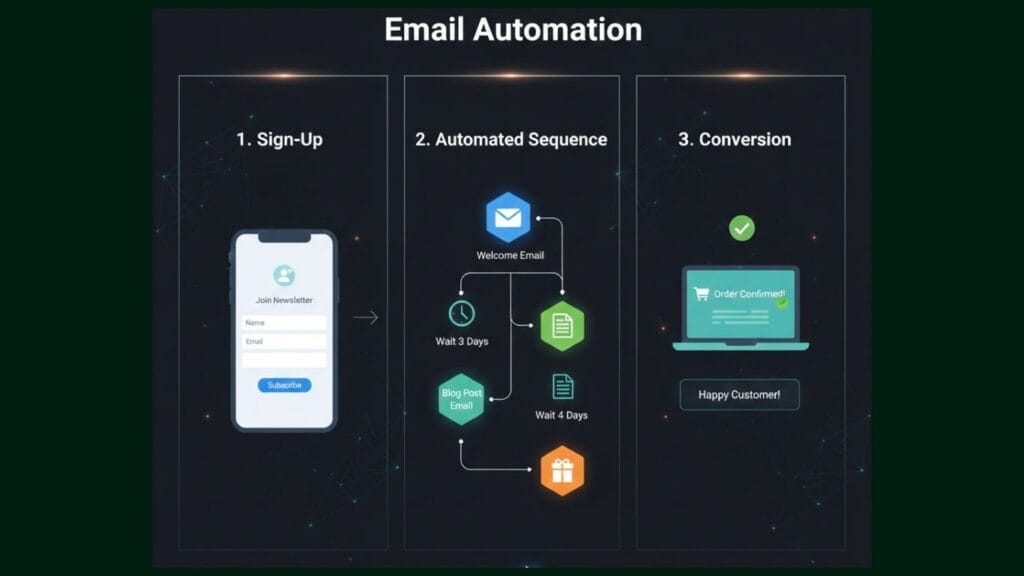
Real example from my business:
- Someone downloads my SEO checklist
- Immediately: Welcome email with the download link
- Day 3: Email with my best SEO tutorial
- Day 7: Case study showing results
- Day 14: Offer for my paid SEO course
I set this up once. It runs 24/7. Converts about 8% of downloads into customers.
Tools that do this well:
- ConvertKit (easiest for beginners)
- ActiveCampaign (more powerful)
- Mailchimp (free tier available)
2. Lead Scoring and Segmentation
What this means: The software tracks what leads do (opens emails, visits pricing page, downloads guides) and assigns points. High-scoring leads get flagged as “ready to buy.”
Why this matters: Instead of treating everyone the same, you focus energy on people actually interested in buying.
Real example:
- Someone visits your pricing page 3 times = +30 points
- Opens every email you send = +20 points
- Downloads multiple resources = +15 points
- Total score hits 50+ = Gets tagged as “hot lead”
- You (or your sales team) get notified to reach out
I increased my conversion rate by 34% just by focusing on high-scoring leads first.
Tools for this:
- HubSpot (industry standard)
- ActiveCampaign (affordable alternative)
- Drip (for e-commerce)
3. Social Media Scheduling
What this means: Write your posts once, schedule them to publish automatically across platforms.
My workflow:
- Spend 2 hours every Sunday
- Write 10-15 social posts
- Schedule them throughout the week
- Software publishes them at optimal times
- I focus on engaging with comments (which CAN’T be automated well)
Tools I use:
- Buffer (simple, affordable)
- Hootsuite (if managing multiple brands)
- Later (best for Instagram)
4. CRM Updates and Task Assignment
What this means: When a lead takes action, your CRM automatically updates their record and creates tasks for your team.
Example workflow:
- Lead fills out contact form
- CRM automatically:
- Creates new contact record
- Tags them based on which form they filled
- Assigns them to correct salesperson
- Creates follow-up task “Call within 24 hours”
- Sends internal notification to sales team
No more manually entering data. No more forgotten follow-ups.
Tools:
- Salesforce (enterprise)
- Pipedrive (small business)
- HubSpot CRM (free, surprisingly good)
5. Abandoned Cart Recovery (E-commerce)
What this means: Someone adds items to cart but doesn’t buy. Automation sends reminder emails.
Typical sequence:
- 1 hour after abandonment: “Did you forget something?”
- 24 hours: “Your items are waiting” (maybe include reviews)
- 48 hours: “Last chance – 10% discount code”
This single automation recovers 15-20% of abandoned carts on average. That’s pure profit you were leaving on the table.
Tools:
- Klaviyo (e-commerce focused)
- Omnisend (affordable)
- Shopify Email (if using Shopify)
6. Webinar Registration and Follow-up
The automation:
- Someone registers for webinar
- Immediately: Confirmation email with calendar invite
- Day before: Reminder email
- 1 hour before: Final reminder with join link
- During webinar: Automated attendee list
- After webinar: Replay email to attendees, “Sorry we missed you” to no-shows
- 3 days later: Offer related to webinar topic
I used to do all this manually. It was chaos. Now it runs perfectly every time.
Tools:
- WebinarJam (automation built-in)
- Zoom + Zapier (connect to email tool)
- Demio (specifically designed for automated webinars)
Getting Started: Your First Automation (Step-by-Step)
Don’t try to automate everything at once. Start here:
Week 1: Welcome Email Sequence
Why start here: Simple, high-impact, immediate time savings.
What you need:
- Email marketing tool (ConvertKit, Mailchimp, ActiveCampaign)
- 3-5 welcome emails written
- 30 minutes to set it up
The sequence:
- Email 1 (Immediate): Welcome + deliver what they signed up for
- Email 2 (Day 2): Your story or “How I can help you”
- Email 3 (Day 5): Your best free resource
- Email 4 (Day 8): Social proof (testimonials, case studies)
- Email 5 (Day 12): Your main offer or next step
Pro tip: Don’t write perfect emails. Write conversational ones. You can improve them later based on open rates.
Week 2: Social Media Scheduling
Why this next: Frees up daily time, maintains consistency.
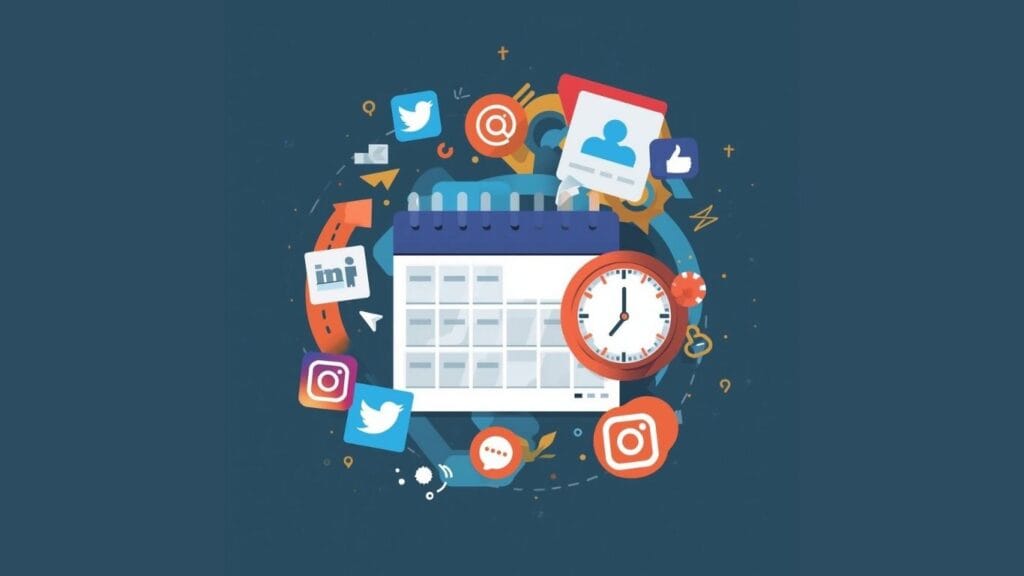
Simple approach:
- Pick ONE platform to start (wherever your audience is)
- Create 1 week of content (7 posts)
- Schedule them using Buffer or Hootsuite
- Monitor performance
- Repeat next week, improving based on what worked
Don’t overthink it. Consistency beats perfection.
Week 3: Lead Capture Automation
Set up:
- Opt-in form on your website
- Connected to email tool
- Triggers welcome sequence (you already built this!)
- Maybe adds to CRM if you have one
Result: Every new subscriber gets nurtured automatically while you sleep.
Biggest Mistakes I Made (So You Don’t Have To)
Mistake 1: Automating Everything Too Fast
I got excited and tried to automate 15 different workflows in week one. Everything broke. Leads got wrong emails. I sent duplicate messages. It was embarrassing.
Better approach: Automate one thing at a time. Test it for 2 weeks. Then add the next automation.
Mistake 2: “Set and Forget”
I automated my email sequence and ignored it for 3 months. Open rates dropped from 35% to 18%. Why? My content got stale and my audience changed.
Better approach: Review automations monthly. Update content quarterly. Check metrics weekly.
Mistake 3: Over-Automating Personal Touch
I automated SO much that my emails felt robotic. Conversion rates dropped.
What I learned: Automate the repetitive stuff. Keep the personal stuff human. If someone replies to your automated email, respond personally. If a high-value lead enters your system, call them yourself.
Mistake 4: Buying Expensive Tools Too Early
Started with HubSpot Marketing Hub at $800/month. Used maybe 20% of features. Wasted money.
Better approach: Start with free/cheap tools. Upgrade only when you consistently hit their limits.
Mistake 5: Not Testing Before Launching
Sent 500 people an email with a broken link. Sent cart abandonment emails to people who already purchased (awkward).
Always test: Send test emails to yourself. Click every link. Go through entire sequence before turning it on.
How Much Does Marketing Automation Cost?
Real pricing for 2026:
Budget Option ($0-50/month)
- Mailchimp Free: Up to 500 contacts, basic automation
- HubSpot Free CRM: Contact management, basic email
- Buffer Free: 3 social accounts, 10 scheduled posts
- Total: $0-30/month
Good for: Solopreneurs, new businesses, testing automation
Mid-Range ($100-300/month)
- ConvertKit Creator: $29/month (1,000 subscribers)
- ActiveCampaign Plus: $49/month (1,000 contacts)
- Buffer Essentials: $6/month per channel
- Zapier Starter: $29.99/month (750 tasks)
- Total: $100-200/month
Good for: Growing businesses, 1-5 person teams
Professional ($500-2,000/month)
- HubSpot Marketing Hub: $800/month
- ActiveCampaign Professional: $149/month (2,500 contacts)
- Salesforce Sales Cloud: $75/user/month
- Total: $500-2,000/month
Good for: Established businesses, agencies, larger teams
My recommendation: Start cheap. Most businesses don’t need expensive tools until they’re managing 5,000+ contacts or have complex sales processes.
Best Marketing Automation Tools in 2026
Based on my testing (and money spent):
For Email Marketing Automation
Winner: ActiveCampaign
- Powerful automation builder
- Great deliverability rates
- Affordable for features you get
- Learning curve is moderate
Runner-up: ConvertKit
- Easiest for beginners
- Clean interface
- Built for creators/bloggers
- Limited compared to ActiveCampaign
For All-in-One Marketing
Winner: HubSpot
- Everything in one platform
- Free CRM is actually useful
- Scales with your business
- Expensive once you grow
Runner-up: Keap (formerly Infusionsoft)
- Strong for service businesses
- Good CRM integration
- Can feel overwhelming
For E-commerce
Winner: Klaviyo
- Built specifically for e-commerce
- Deep Shopify integration
- Powerful segmentation
- Worth the price if you sell products
Runner-up: Omnisend
- More affordable than Klaviyo
- Good for smaller stores
- Easier to learn
For Social Media
Winner: Buffer
- Simple, clean interface
- Affordable pricing
- Great analytics
- Does what it says without bloat
Runner-up: Hootsuite
- More features than Buffer
- Better for agencies
- More expensive
ROI: Is Marketing Automation Worth It?
Let me show you my actual numbers:
Monthly automation costs: $178
- ActiveCampaign: $79/month
- Buffer: $15/month
- Zapier: $29/month
- Calendly: $10/month
- Various small tools: $45/month
Time saved per month: ~40 hours My hourly rate: $75
Value of time saved: 40 hours × $75 = $3,000/month
Revenue directly from automation:
- Email sequences: ~$2,400/month
- Abandoned cart recovery: ~$800/month
- Lead nurturing: ~$1,200/month Total: ~$4,400/month
ROI calculation:
- Investment: $178/month
- Return: $4,400/month (revenue) + $3,000/month (time value) = $7,400
- ROI: 4,056%
Even if my numbers are way higher than yours, the ROI is usually incredible.
Common Questions About Marketing Automation
“Isn’t automation impersonal?”
Only if you do it wrong. Good automation feels personal because you send the right message at the right time.
A personalized automated email sent at 2 PM (when they’re most likely to read it) beats a generic manual email sent whenever you remember.
“Do I need to know how to code?”
No. Modern automation tools are drag-and-drop. If you can use email, you can set up basic automation.
Advanced stuff might need help, but start simple.
“What if I mess something up?”
You will. Everyone does. That’s why you test on yourself first. And why you review metrics weekly. Mistakes are easy to fix if you catch them quickly.
“How long until I see results?”
First automation (welcome emails): Immediate results Lead nurturing sequences: 30-60 days Complex multi-channel automation: 90 days+
Start simple, see quick wins, build from there.
“Can small businesses benefit or is this just for big companies?”
Small businesses benefit MORE. When you have limited time and resources, automation multiplies your impact. Large companies already have big teams. You need automation to compete.
The Bottom Line
Marketing automation isn’t about replacing human connection. It’s about freeing you up to focus on the parts that actually need a human touch.
Automate the repetitive tasks. Use the time you save for strategy, creativity, and building real relationships with customers.
Start small. Test everything. Improve gradually. The compound effect is massive.
After 2 years of automating my marketing, I work fewer hours, make more money, and provide better customer experiences. That’s not magic—it’s just letting software do what it does best so you can do what you do best.
Ready to automate your first workflow? Pick ONE thing from this guide and set it up this week. That’s it. One automation. See the results. Then build from there.
Want to dive deeper into specific automation tools? Check out my detailed reviews:
- ActiveCampaign Review: Is It Worth the Hype? (coming soon)
- ConvertKit vs Mailchimp: Which Email Tool for Beginners? (coming soon)
- Best CRM with Built-in Automation (coming soon)
Have questions about marketing automation? Drop them in the comments or contact me – I read and respond to everything!
Disclosure: Some links in this article are affiliate links. I may earn a commission if you purchase through them, at no extra cost to you. I only recommend tools I’ve personally used and believe provide genuine value.
Also Read: Digital Marketing Trends 2026: AI, Video & Tools You Need
![Top 200+ Directory Submission Sites List for 2026 [Verified & High-Quality]](https://www.thestackanalyst.com/wp-content/uploads/2026/02/Top-200-Directory-Submission-Sites-List-for-2026-Verified-High-Quality-768x432.jpg)
One Comment