Picture this. It’s 9:30 PM. A client just WhatsApped you: “Can you send the GST invoice today? Accounts closes tomorrow.” You open that Excel template you’ve been using since 2021. Half the formulas are broken. You can’t remember if this client is in a different state. You’re not sure whether to apply IGST or CGST+SGST. And you have absolutely no idea what HSN code to use.
Sound familiar? Yeah. Most Indian freelancers, shop owners, and agency founders have been here more times than they’d like to admit.
Here’s the uncomfortable truth: billing manually in India isn’t just annoying, it’s a legal risk. A single wrong field on a GST invoice can block your client’s Input Tax Credit, flag your returns during a GST audit, or hold up your payment for weeks. And the worst part? Most of these mistakes are completely invisible until the damage is already done.
This guide covers every GST invoice mandatory field you legally cannot skip, how to correctly apply CGST, SGST, and IGST, which document type applies to your situation, and the eight mistakes that attract tax notices. If you want to create a compliant invoice right now while you read, the free GST invoice generator is open in a separate tab.
What Makes a GST Invoice Legally Valid?
A GST invoice isn’t just a payment request. Under the Goods and Services Tax Act, 2017, it’s a legal tax document. It needs specific mandatory fields, correct tax logic, and the right format. Get even one thing wrong and your client can’t claim Input Tax Credit on the transaction. That makes you the problem vendor. Nobody wants to be that.
Most billing errors don’t come from dishonesty. They come from using tools that weren’t built for compliance. Excel templates are the most common offender.
What’s Actually Wrong With Excel and Word Templates?
Look, Excel templates work. Until they don’t. Here’s what breaks down in practice:
The tax rate is hardcoded. It doesn’t automatically switch between CGST/SGST and IGST when you’re billing a client in a different state. You have to remember to do that manually, every single time. And when you’re rushing to meet a client’s deadline, you won’t remember.
There’s no GSTIN validation either. A single typo in your client’s GSTIN, just one wrong digit, and their ITC claim fails. The Excel template has no idea. It just accepts whatever you typed.
Invoice numbering is also completely manual, which means duplicate numbers, skipped numbers, and restarted sequences. All of which are compliance violations under GST rules that can get flagged during GSTR-1 filing.
And HSN/SAC codes? Most templates don’t even have a column for them.
Who Needs to Issue GST Invoices?
If you’re GST-registered and you supply taxable goods or services, you need to issue GST-compliant invoices. Simple as that. That covers freelancers billing clients, retailers selling goods, service agencies invoicing retainer clients, consultants charging fees, and e-commerce sellers shipping across state lines.
Even if you’re under the composition scheme and not collecting GST directly, you still need to issue Bills of Supply in the right format. The document type matters as much as the content, and that distinction is covered later in this guide.
GST Invoice Mandatory Fields: The Complete 2026 Checklist
Here is what most people learn the hard way: it’s not enough for the numbers to be right. The structure has to be right too. Under the CGST Rules, 2017, all GST invoice mandatory fields listed below must appear on every tax invoice. Missing even one can invalidate it for ITC purposes.
| Field | What’s Required |
|---|---|
| Invoice number | Unique, consecutive, no repeats within a financial year |
| Invoice date | Date of issue |
| Supplier’s name and address | As registered under GST, not your trading name |
| Supplier’s GSTIN | Your 15-digit GST Identification Number |
| Recipient’s name and address | Your client’s or buyer’s details |
| Recipient’s GSTIN | Required if the buyer is GST-registered |
| Place of supply | The state where the supply is treated as occurring |
| HSN or SAC code | For goods (HSN) or services (SAC) |
| Description of goods or services | Item name, quantity, unit, and rate |
| Taxable value | The amount before tax is added |
| GST rate and amount | Broken down as CGST+SGST or shown as IGST |
| Total invoice value | Taxable value plus total tax |
| Signature | Of the supplier or an authorised person |
Print this out. Seriously. Stick it next to your desk.
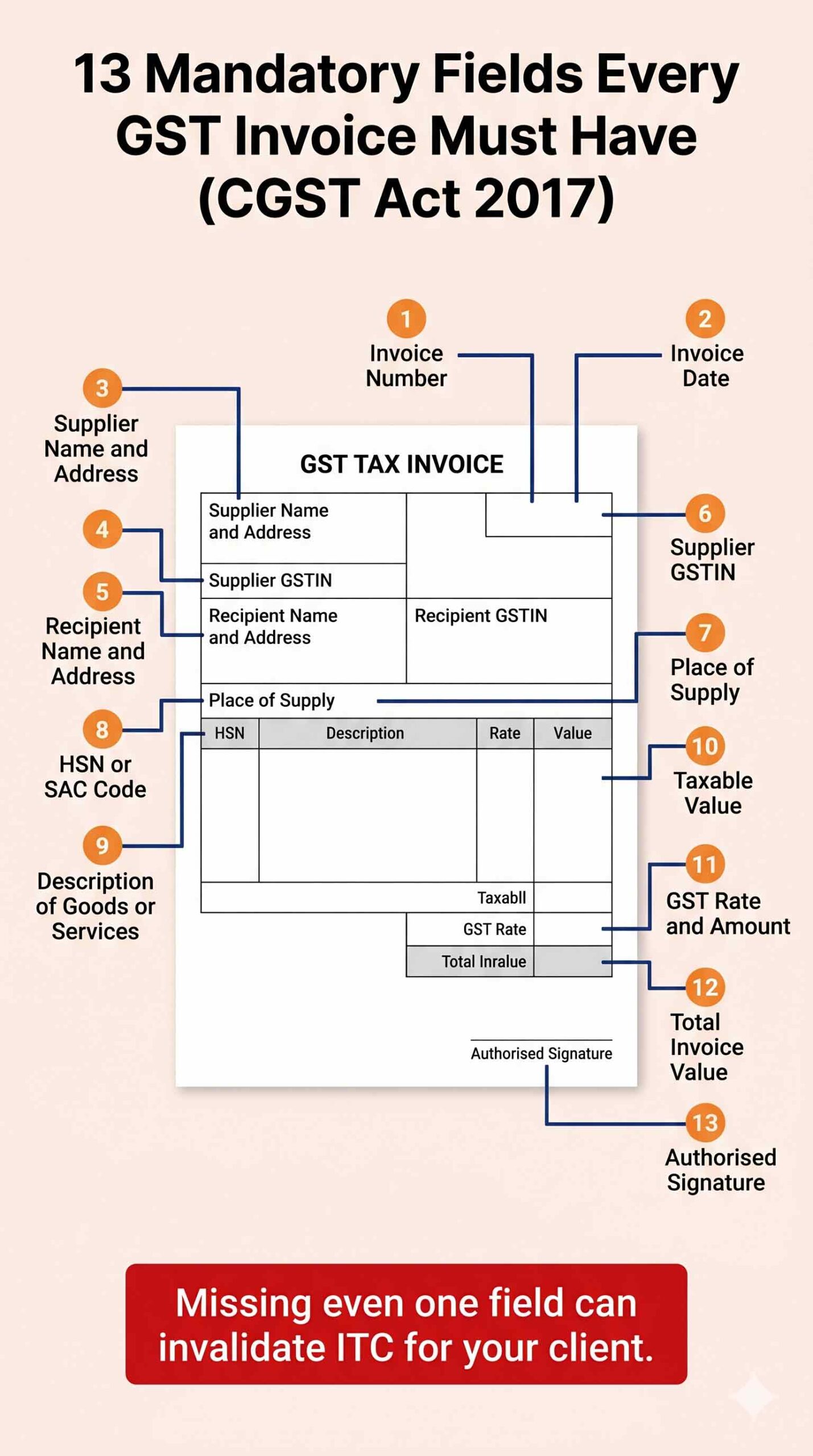
If manually tracking all 13 GST invoice mandatory fields sounds error-prone, the free GST invoice generator fills and validates each one automatically, with no account needed.
CGST vs SGST vs IGST: Let’s Sort This Out Once and for All
This confuses almost everyone when they first register for GST. Here’s the simple version.
If your business and your client are in the same state, you’re doing an intrastate transaction. You charge CGST (Central GST) and SGST (State GST), both at half the applicable rate. So at 18% GST, you’d charge 9% CGST and 9% SGST separately.
If your business and your client are in different states, you’re doing an interstate transaction. You charge only IGST (Integrated GST) at the full rate. So at 18% GST, you charge 18% IGST as a single line.
The total tax amount your client pays is the same either way. Only the split, and who collects what, changes. But your invoice must reflect the correct type. Charging CGST+SGST on an interstate transaction is one of the most common GST invoice mistakes out there, and it causes ITC claim rejections for your client.
Real example: You’re a Delhi-based graphic designer billing a client in Delhi. You charge 9% CGST + 9% SGST. Next month, that same client moves operations to Hyderabad. Now it’s 18% IGST instead. Same 18% total, different tax heads on the invoice.
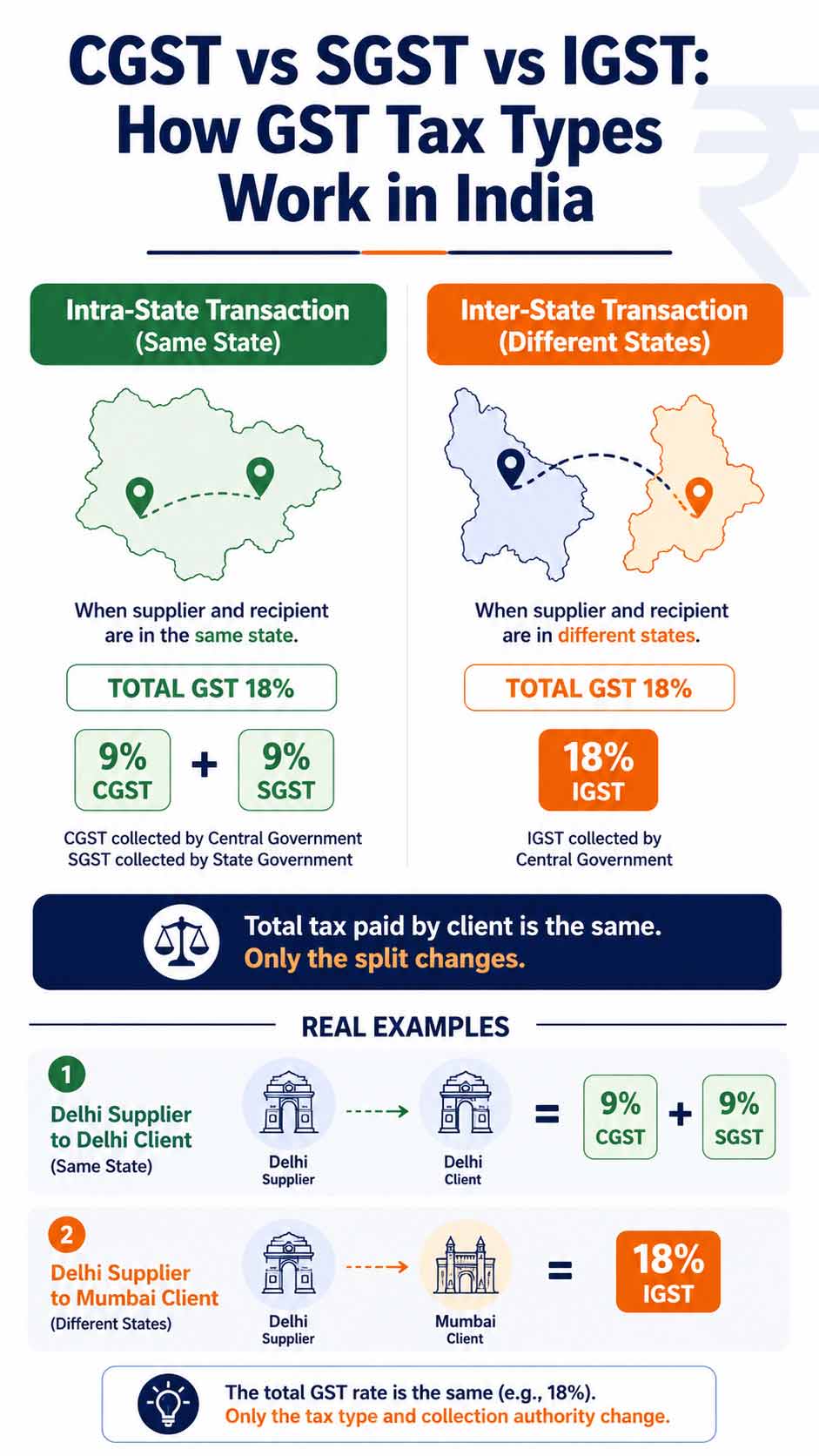
If you’re unsure which applies to a specific client, the GST invoice tool determines CGST+SGST or IGST automatically the moment you enter both states.
HSN Codes vs SAC Codes: Why They Matter and Which One You Need
HSN (Harmonized System of Nomenclature) codes are for goods. SAC (Service Accounting Codes) are for services. Every line item on your invoice needs the right code.
The threshold for when you’re legally required to include them:
- Turnover under Rs.1.5 crore: HSN/SAC codes are optional under law, but many clients require them anyway
- Turnover between Rs.1.5 crore and Rs.5 crore: 4-digit HSN/SAC codes are mandatory
- Turnover above Rs.5 crore: 6-digit codes are mandatory
Even if you’re below the threshold, it’s a good habit to include them. Large enterprise clients often make it a vendor requirement, and having clean, code-complete invoices makes any future audit much less painful.
8 GST Invoice Mistakes That Attract Tax Notices (And How to Avoid Them)
This is the section most billing guides completely skip. These mistakes are incredibly common and the consequences (ITC rejections, compliance notices, audit scrutiny) are entirely avoidable. Most of them come down to getting one or more GST invoice mandatory fields wrong in value, format, or document type.
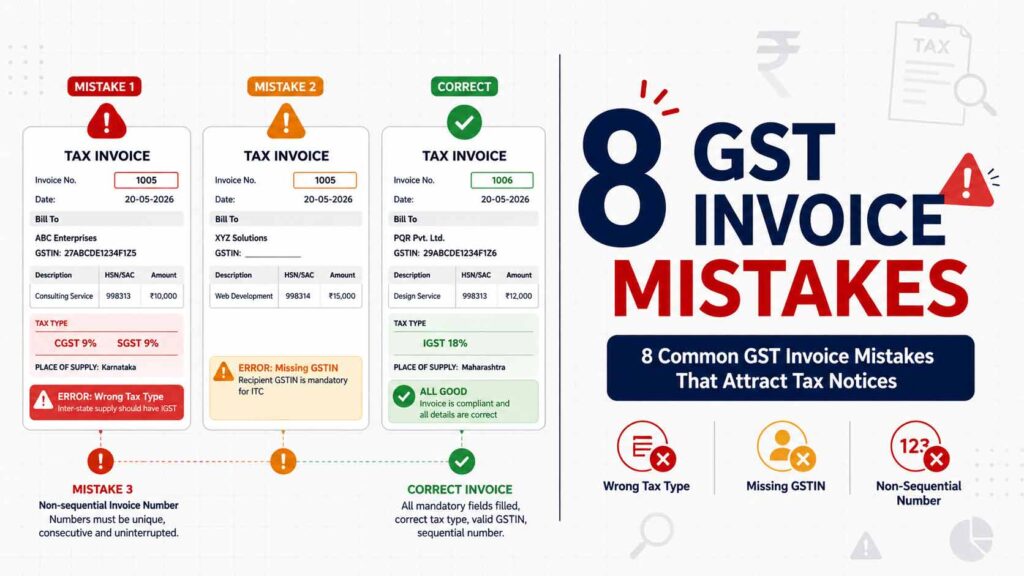
Go through your last five invoices against this list.
Mistake 1: Charging CGST+SGST on an interstate sale. Already covered above, but it’s worth repeating because it’s the single most common error. When your client is in a different state, it must be IGST. No exceptions. This mistake causes ITC claim failure for your client, who will come back to you frustrated and asking for a corrected invoice. A compliant GST invoice generator eliminates this mistake entirely by detecting both states automatically.
Mistake 2: A typo in the GSTIN. One wrong digit in either your GSTIN or your client’s GSTIN renders the invoice invalid for ITC purposes. This happens constantly with manually typed GSTINs. A tool with GSTIN format validation catches this before the invoice goes out.
Mistake 3: Non-sequential invoice numbers. Your invoice numbers must be unique, consecutive, and uninterrupted within a financial year. Restarting numbering mid-year, using different sequences for different clients, or accidentally skipping numbers are all violations. The GSTR-1 portal detects gaps and can raise a scrutiny query.
Mistake 4: Wrong or missing place of supply. The place of supply determines which state’s GST applies and directly controls your IGST vs CGST+SGST decision. For most B2B transactions it’s the recipient’s location. For some services like events, transportation, and certain B2C transactions, different rules apply. Getting this wrong means the wrong government receives the tax, and that’s a problem that surfaces during annual reconciliation.
Mistake 5: No document type in the header. Your invoice must explicitly say “Tax Invoice” at the top for taxable supplies, or “Bill of Supply” for exempt supplies or composition scheme transactions. Just writing “Invoice” doesn’t satisfy the requirement. This is a basic formatting issue that trips up many small businesses.
Mistake 6: Missing the Reverse Charge Mechanism declaration. If a transaction falls under RCM, where the buyer pays the GST instead of the seller, your invoice must clearly state “Reverse Charge Applicable: Yes.” Missing this declaration is a compliance failure even when the correct tax is paid. The declaration is what makes it auditable.
Mistake 7: No HSN or SAC code when you’re above the threshold. If your turnover is between Rs.1.5 crore and Rs.5 crore, 4-digit codes are legally required on every invoice. Businesses in this bracket who don’t include them are quietly accumulating compliance risk. The GSTR-1 system now flags missing codes, and repeated violations can attract a penalty notice under Section 122 of the CGST Act.
Mistake 8: Issuing a Tax Invoice for exempt goods. If you sell GST-exempt goods or you’re registered under the composition scheme, you cannot issue a Tax Invoice. You must issue a Bill of Supply. Issuing the wrong document type creates discrepancies that get caught during quarterly reconciliation. The documents serve different legal purposes and cannot be substituted for each other.
Tax Invoice vs Proforma Invoice vs Bill of Supply: What’s Actually the Difference?
These get used interchangeably in Indian business all the time. They shouldn’t be.
| Document | When to Use It | Is It a Tax Document? | Can Buyer Claim ITC? |
|---|---|---|---|
| Tax invoice | Selling taxable goods or services as a GST-registered business | Yes | Yes |
| Proforma invoice | Sending a quote or advance notice before actual supply | No | No |
| Bill of supply | Selling exempt goods/services, or if you’re under composition scheme | Yes (non-taxable) | No |
| Credit note | Reducing value after the original invoice, returns, discounts | Yes | Reversal of ITC |
| Debit note | Increasing value after original invoice, price revisions | Yes | Additional ITC |
A proforma invoice gets used a lot when a client needs internal purchase approval before committing to the purchase. It looks like an invoice, but it creates no GST liability and gives the buyer no ITC rights. Once the actual goods or services are delivered, you issue the real tax invoice. Using a proforma in place of a tax invoice, which plenty of small businesses do, is a compliance error that won’t show up immediately but will during audit.
GST Invoicing by Business Type: What You Need to Know
Freelancers and Consultants
If you’re a freelancer (designer, copywriter, developer, marketing consultant), your invoices are service-based, so you’ll be using SAC codes. Common ones: 998311 for management consulting, 998314 for advertising and marketing services, 998312 for business process management.
The biggest pain point for freelancers isn’t the format. It’s remembering to switch between CGST+SGST and IGST when billing clients in other states. When you have ten active clients across India, that logic is easy to mess up. Getting it wrong on even one invoice creates an ITC problem for that client, which damages the relationship.
Retail Shop Owners
Retailers deal with goods, which means HSN codes, and often multiple GST rates on a single invoice. A mobile accessories shop might sell a phone case at 18% and a screen protector at 12% in the same transaction. An online food retailer might mix 5% and 0% items. Managing that in Excel is doable but error-prone, especially when invoice volumes are high.
Service Agencies and Consulting Firms
Agencies running monthly retainers for multiple clients issue the same invoice structure month after month. The amounts might differ slightly, but the structure (service description, SAC code, client GSTIN, tax rate) is often identical. The compliance risk here is cumulative: a small error repeated across 20 client invoices every month becomes a significant problem by the time annual reconciliation comes around.
E-Commerce Sellers
Almost every e-commerce transaction is interstate, which means IGST by default. Except when it isn’t. When you’re shipping to a customer in the same state as your warehouse, it flips to CGST+SGST. This place-of-supply switching is genuinely complicated when you’re managing high order volumes, and getting it wrong creates reconciliation problems during quarterly GSTR filing.
Free vs Paid GST Invoice Tools: Which One Do You Actually Need?
| Feature | Free Browser-Based Tool | Excel Template | Tally / Zoho (Paid) |
|---|---|---|---|
| Cost | Free, no account required | Free | Rs.5,000 to Rs.18,000/year |
| CGST/SGST vs IGST auto-logic | Yes | Manual | Yes |
| GSTIN validation | Yes | No | Yes |
| HSN/SAC code support | Yes | Manual entry | Yes |
| PDF download | Yes, instant | Needs formatting | Yes |
| Sequential invoice numbering | Automatic | Manual | Automatic |
| Data stored on external server | No, browser only | Local file | Yes (cloud) |
| Software installation required | No | No | Yes / web app |
| Best for | Freelancers, SMBs | Very basic use | Growing businesses |
| IRP e-invoicing integration | No | No | Yes (paid plans) |
For freelancers and small businesses issuing fewer than 50 invoices a month, a browser-based free tool handles every compliance requirement without the cost or setup overhead. When your volume grows, or when the e-invoicing mandate eventually covers your turnover bracket, a paid platform becomes worth evaluating. Until that point, you’re paying for features you don’t need.
The E-Invoicing Mandate: What’s Coming and Are You Ready?
If your business is growing, this is worth understanding now rather than scrambling later.
The GST Council has been steadily lowering the turnover threshold for mandatory e-invoicing. Invoices must now be registered through the Invoice Registration Portal (IRP) and carry a government-issued IRN (Invoice Reference Number) and QR code. The timeline so far:
- October 2020: Rs.500 crore+ turnover
- April 2021: Rs.100 crore+ turnover
- April 2022: Rs.20 crore+ turnover
- October 2022: Rs.10 crore+ turnover
- August 2023: Rs.5 crore+ turnover
The direction is clear. Further reductions are expected as GSTN infrastructure matures.
If your turnover is currently under Rs.5 crore, a free invoice generator covers all your legal requirements today. But here’s the practical advice: start building clean invoice records right now. Sequential numbering, correct GSTINs, complete HSN/SAC codes. When the e-invoicing mandate eventually reaches your turnover bracket, businesses with clean historical data will transition smoothly. Those with messy records won’t.
Frequently Asked Questions
What is a GST invoice and why does the format matter?
A GST invoice is a legal tax document under the Goods and Services Tax Act, 2017, not just a payment request. The format matters because your client uses it to claim Input Tax Credit. If mandatory fields are missing, the wrong tax type is applied, or the GSTIN has a typo, the ITC claim fails. That makes you the vendor your client has to chase for a corrected invoice.
What are the GST invoice mandatory fields under Indian law?
There are 13 GST invoice mandatory fields required under Section 31 of the CGST Act: a unique sequential invoice number, the invoice date, your name and GSTIN, your client’s name and GSTIN (if they’re registered), the place of supply, each item’s description with HSN or SAC code, quantity and rate, the taxable value, the applicable GST broken down correctly, the total invoice value, and your authorised signature. The checklist table earlier in this guide covers all of them.
Why is GST compliance important in invoice generation?
Your invoice is the document your client uses to claim Input Tax Credit. If the invoice is wrong (wrong tax type, missing fields, incorrect GSTIN), they can’t claim that credit. That effectively makes your services more expensive for them than a competitor who invoices correctly. Repeated compliance failures also attract scrutiny from the GST department and can result in penalties under Section 122 of the CGST Act.
What is the penalty for issuing an incorrect GST invoice?
Under Section 122 of the CGST Act, issuing an invoice without following the prescribed rules can attract a penalty of Rs.10,000 or an amount equivalent to the tax evaded, whichever is higher. This applies to errors like issuing a Tax Invoice for exempt goods, omitting mandatory fields, or applying the wrong tax type. Penalties can also be levied on the recipient if they knowingly accept a non-compliant invoice to claim incorrect ITC.
What is the time limit for issuing a GST invoice after supply?
For goods, a tax invoice must be issued at the time of removal (for movement of goods) or delivery. For services, the invoice must be issued within 30 days of the date of supply. For banking and financial institutions, the limit is 45 days. Issuing invoices outside these windows is a compliance violation and can affect the tax period in which ITC becomes available to your client.
Are there any limitations to using free GST invoice generators?
For most small businesses and freelancers, a free browser-based tool covers everything: correct tax calculations, proper format, PDF download, and no cap on invoice count. Where they fall short is invoice tracking, automated payment reminders, GSTR filing integration, and IRP e-invoice generation for businesses above the Rs.5 crore threshold. If you need those features, a paid platform is worth the investment. If you don’t, you’re paying for features you won’t use.
Can I amend a GST invoice after I’ve filed GSTR-1?
Yes, but within limits. Amendments to invoices reported in GSTR-1 can be made in the GSTR-1 of the following month using the amendment tables (Table 9A for B2B invoices, Table 9B for credit/debit notes). You cannot amend invoices beyond the due date of the GSTR-1 for September of the following financial year, or the date of filing the annual return, whichever is earlier. This is why getting the invoice right the first time matters far more than being able to fix it later.
Do I need to issue a GST invoice for advance payments received?
For services, yes. GST is applicable on advance receipts, and you are required to issue a receipt voucher at the time of receiving the advance. Once the service is actually supplied, you issue the final tax invoice and adjust the advance. For goods, the GST Council has suspended the requirement to pay GST on advances (as of the latest notifications), but you should verify the current position with a tax professional as rules can change between GST Council meetings.
What are the common errors to avoid when creating GST invoices?
The big ones: applying CGST+SGST to an interstate transaction instead of IGST, typing the GSTIN wrong, using non-sequential invoice numbers, getting the place of supply wrong, not labelling the document “Tax Invoice” or “Bill of Supply”, omitting the RCM declaration when applicable, missing HSN/SAC codes when your turnover requires them, and issuing a Tax Invoice for exempt goods instead of a Bill of Supply. The detailed breakdown with consequences for each mistake is in the section above.
Create Your First GST Invoice Right Now
You now have the full list of GST invoice mandatory fields, the tax type logic, the document type breakdown, and the eight mistakes that attract notices. Everything you need to bill correctly from today.
The free GST invoice generator has every GST invoice mandatory field built in, the CGST/SGST vs IGST logic is automatic, and the PDF downloads instantly. No account required, works on any device.
Need more free tools? Check out our keyword density checker, QR code scanner, and image background remover. All browser-based, all free, no sign-up anywhere.