Title tag and meta description best practices are the fastest way to turn existing rankings into more clicks without writing a single word of new content. Most pages already ranking on Google are losing traffic every day simply because their snippet is written wrong. This guide covers the exact character limits, why Google rewrites your description, how to improve click-through rate on pages already ranking, and a step-by-step audit process you can run today.
27.6%. That is the average click-through rate for the number one result in Google, according to a Backlinko analysis of 4 million search results. Drop to position three and you are looking at 11%. By position ten, you are fighting over scraps at 2.4%.
The gap between those numbers is not always about who ranks higher. It is about whose snippet makes someone stop scrolling. Your title tag and meta description are doing that job on every single search impression, whether you have thought about them or not.
What Is a Title Tag and Why Does It Matter for SEO?
A title tag is the HTML element that defines the clickable blue headline shown in a Google search result. It also appears in browser tabs when someone visits your page. It is the first thing a searcher reads and the single biggest factor in whether they click your result or scroll past it.
Unlike your H1 heading, which lives on the page itself and has no character limit, the title tag lives in your page head section and is directly visible in search results. Getting it right matters more than most on-page SEO tasks because it affects both your ranking and your click-through rate at the same time.
Title Tag Character Limit: How Long Is Too Long?
Google does not measure title tags by character count. It measures by pixel width, which means the exact cutoff varies depending on which characters you use. Wide characters like W, M, and capital letters take up more space than narrow ones like i, l, or t.
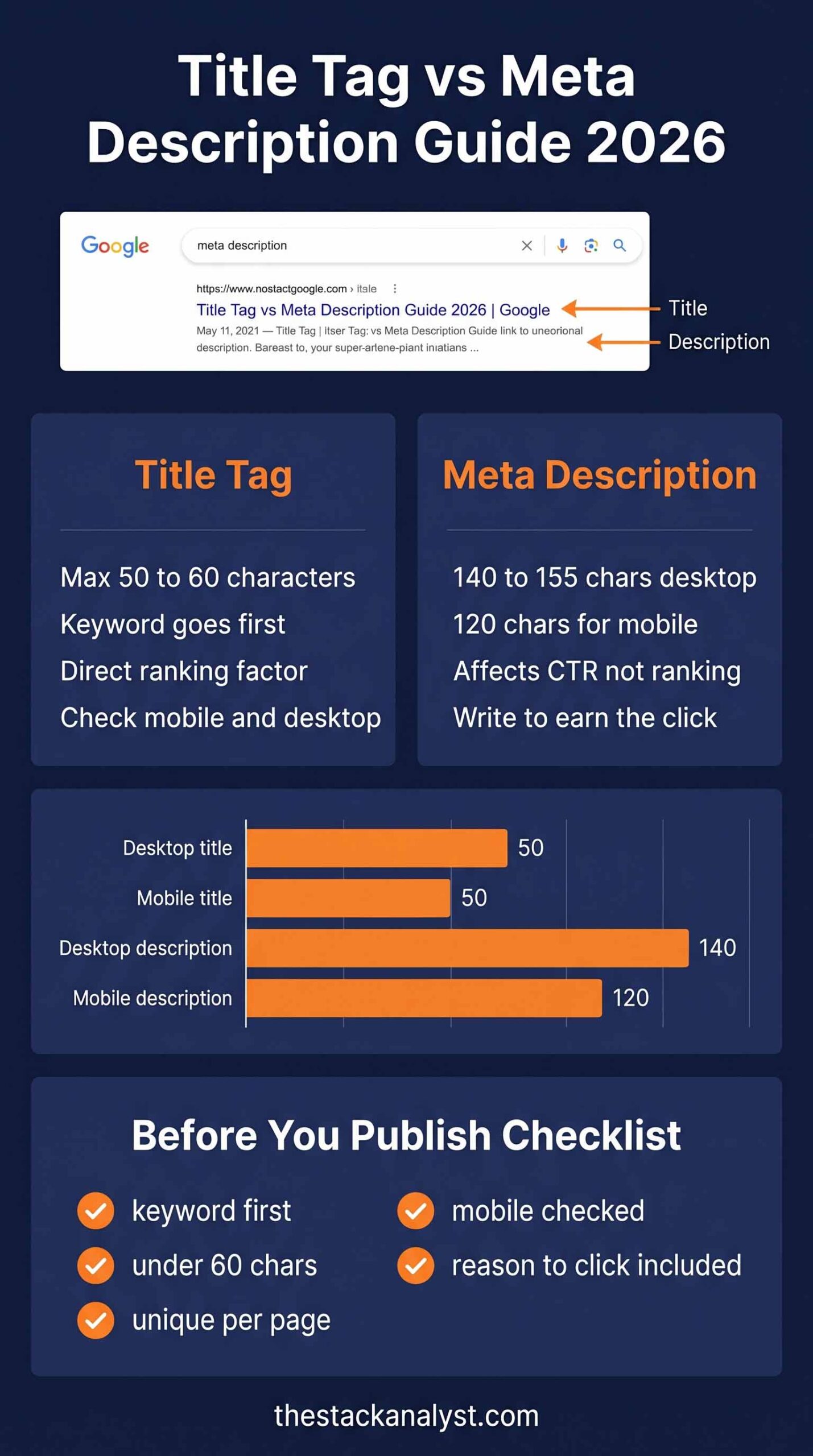
As a practical working limit, keep your title between 50 and 60 characters. Google typically renders up to around 580 pixels of title width on desktop, which corresponds to roughly 55 to 60 characters in a standard font. Go over that and the title gets cut off with an ellipsis, often right in the middle of the most important word.
The safest way to check before publishing is to run your title through a Google snippet preview tool that shows the actual rendered output on both desktop and mobile, not just a character count. A character counter tells you the number of characters. A visual preview tells you what the searcher actually sees.
What Happens When Your Title Tag Is Too Long?
When a title exceeds the display width, Google truncates it with three dots at the point of cutoff. This almost always happens mid-sentence and often cuts off the keyword, the brand name, or the most compelling part of the headline. Searchers see an incomplete title and often skip past it entirely because it looks unprofessional and unfinished.
Check every title on desktop and mobile separately. Mobile screens are narrower and truncate titles earlier than desktop, even if the title looks perfectly fine on a larger screen.
Title Tag and Meta Description Best Practices That Most Guides Skip
Put Your Primary Keyword First in the Title
Nielsen Norman Group research shows users spend roughly 1.17 seconds deciding whether to click a search result. Your most important word needs to land in that window. That means it needs to come first, not buried after filler phrases like “Find out how to” or “Get the best”.
Compare these two titles for the same page:
❌ “Get Professional Emergency Plumbing Help in Melbourne 24/7” (keyword buried in the middle, 58 characters)
✅ “Emergency Plumber Melbourne | 24/7 Fast Response” (keyword in the first two words, 50 characters, punchy)
The second version fits cleanly and the primary keyword lands exactly where the user’s eye goes first. This is one of the core title tag and meta description best practices that directly affects CTR without changing your ranking position at all.
What Is the Difference Between a Title Tag and H1?
Your title tag and H1 do not have to be identical, but they should closely align. The H1 is the on-page headline that visitors read after clicking. It can be longer and more descriptive because it has no pixel limit. The title tag is the headline that searchers read before clicking, so it needs to be tighter and more keyword-focused.
When your title tag and H1 are well aligned, Google is less likely to rewrite your title in search results. When they contradict each other or cover different topics, Google often pulls the H1 text and uses that as the title link instead of your actual title tag.
Use Numbers and Specific Details
Numbers stand out in text-heavy search results. “15 Easy Weeknight Dinners” outperforms “Easy Weeknight Dinners” because the number sets a clear expectation before the click. Specifics reduce uncertainty, and uncertainty is what stops clicks from happening.
Add Your Brand Name at the End
Placing your brand name at the end separated by a pipe or dash helps with branded searches and builds recognition over time. Keep it at the end so the primary keyword holds the strongest position at the front. If the title is already at 55 characters without the brand name, leave it out for that page rather than forcing a truncation.
Title Tag Checklist Before Publishing
- Primary keyword appears in the first two to three words
- Total length is between 50 and 60 characters
- Title reads naturally, not like a string of keywords
- Each page on the site has a completely unique title
- Brand name at the end if character space allows
- Both desktop and mobile preview checked before publishing
Does Meta Description Affect Your Google Ranking?
No, meta descriptions are not a confirmed Google ranking factor. But they directly affect click-through rate, and CTR does influence rankings over time. If your result earns significantly more clicks than every other result for a given keyword, Google reads that as a signal that your page is the better answer and gradually pushes it higher in results.
For a site getting 10,000 impressions a month, a 1% improvement in CTR means 100 extra visitors with no new content and no new backlinks. Just better title tag and meta description best practices applied to pages that are already live.
Your meta description is also where Google bolds matching keywords when someone searches. That visual emphasis draws the eye down the page. If your description does not contain the search term, it will not be bolded and will look less relevant than a competitor whose description does include it naturally.
Meta Description Character Limit: Desktop vs Mobile
Most guides say 150 to 160 characters and leave it there. The real picture is more specific and the difference between desktop and mobile matters a lot for sites where the majority of traffic comes from phones.
| Device | Visible Description Length | What To Do |
| Desktop | Up to 155 to 160 characters | Aim for 150 to 155 characters |
| Mobile | Up to 120 characters | Put the most important information in the first 120 characters |
| Safe for both | Up to 120 characters | If you cannot write two versions, optimise for mobile first |
With over 60% of Google searches happening on mobile, a description that looks fine on desktop but gets cut off on a phone is underperforming on the majority of your impressions. Always check the mobile preview before publishing, not just the desktop view. The free SERP Simulator shows both side by side so you can see exactly where the mobile cutoff lands on your specific description.
Why Does Google Rewrite My Meta Description?
This is one of the most common frustrations in SEO. You write a description carefully, check how it looks, publish the page, then search for it a week later and find Google is showing completely different text underneath your title.
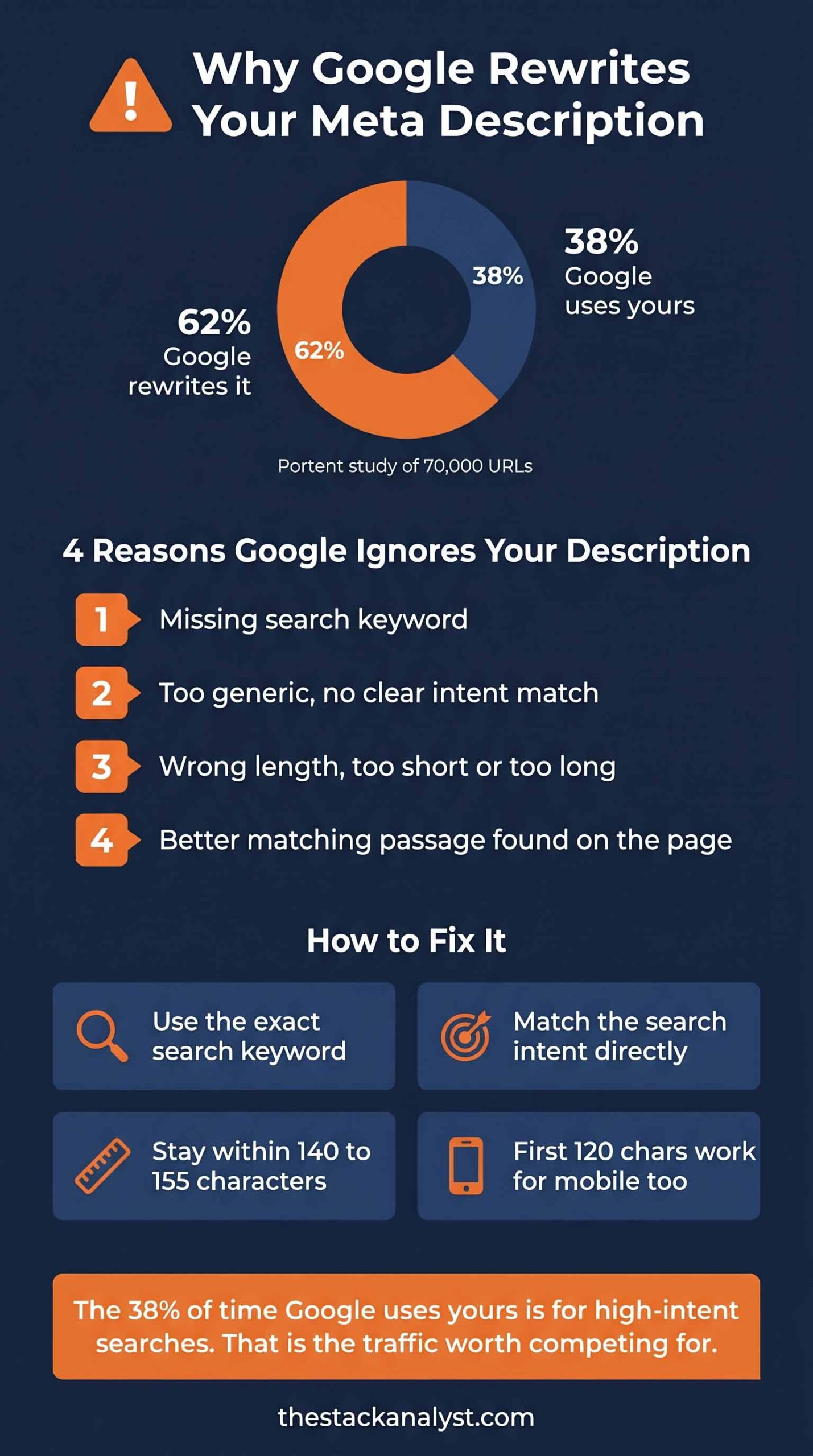
Google rewrites meta descriptions roughly 62% of the time according to a Portent study of 70,000 URLs. It does this when it decides your description does not closely enough match the specific search query the user typed. Google pulls replacement text from the most relevant passage on your page instead of using what you wrote.
There are four main reasons Google rewrites a meta description:
- Your description does not include the search term the user typed
- Your description is a generic summary rather than a relevant direct answer
- Your description is too short or too long for the available display space
- There is a section of your page that better matches the query than your description does
According to Google’s official snippet documentation, Google automatically determines the best snippet to show based on the user’s query and the content of the page. Your meta description is the starting point, not a guarantee. The fix is to write a description that includes your target keyword naturally, directly addresses what the searcher wants to know, and summarises the page content accurately. When your description closely matches the query intent, Google tends to use it as written.
Even when Google rewrites yours, your original text shapes which passage it pulls from the page. Writing a strong description always helps either way. And the roughly 38% of the time Google does use your description, it tends to be for informational, high-intent searches that convert at the highest rate. That is exactly the traffic worth competing for.
How to Write a Meta Description That Gets Clicks
Most meta descriptions read like a content summary written for the author, not the reader. That is not what they should be. A well-written description gives the reader a specific reason to click your result right now instead of the nine other results on the same page.
Write for the Reader, Not the Character Limit
The 150 to 160 character range is a ceiling, not a target. A focused 110-character description with a clear benefit and a natural reason to click will outperform a padded 158-character one that trails off into vague filler. Use the character count as a guardrail, not as a box to fill to the maximum every time.
Lead With What the Reader Gets
The first sentence decides whether the reader keeps reading or moves on to a competitor. Open with the direct benefit or the direct answer, not background context or introductory filler.
Compare these two descriptions for the same recipe article:
❌ “This article contains 15 easy weeknight dinner recipes that are suitable for families in the UK.”
✅ “15 quick dinners ready in under 30 minutes. No fancy ingredients. Real food UK families actually want to eat.”
The second version speaks directly to the reader. It removes uncertainty. It gives a specific reason to click this result rather than any of the others. The first version could describe a thousand different recipe articles and gives no reason to choose this one specifically.
Include Your Target Keyword Naturally
Google bolds words in your description that match what the searcher typed. A description with the keyword will visually stand out against results that do not include it. Place the keyword in the first sentence so it appears before any mobile truncation cuts the description short.
Meta Description Checklist Before Publishing
- Target keyword appears naturally in the first sentence
- Written as a reason to click, not a summary of the content
- Most important information fits within 120 characters for mobile
- Total length is between 140 and 155 characters for desktop
- Each page on the site has a completely unique description
- Mobile preview checked using a SERP preview tool before publishing
Common Title Tag and Meta Description Mistakes That Kill CTR
1. Title Tag Too Long and Getting Cut Off
Going over 60 characters causes Google to truncate the title with an ellipsis at the cutoff point. If the keyword or the most compelling part of your headline lands after the cutoff, the searcher never sees it. This is one of the most common title tag and meta description best practices violations because it is invisible until you actually preview the snippet. Always check both desktop and mobile renders before every single publish.
2. Duplicate Titles and Descriptions Across Pages
Using the same title or description on multiple pages is one of the most common technical SEO errors. Studies show 50% of websites have duplicate meta descriptions and 54% have duplicate title tags. Google treats duplicate metadata as a low-quality signal and often rewrites both. Every page needs unique metadata that reflects its own specific content and primary keyword target.
3. Keyword Buried in the Middle of the Title
Starting a title with “Find Out How to” or “Get the Best” pushes the actual keyword further right. Searchers scan left to right and decide in about one second. If the keyword is not within the first two to three words, the click often goes to a competing result that leads with it directly.
4. Description That Summarises Instead of Sells
A description that says “In this article we cover X, Y and Z” gives the reader no reason to pick your result over the nine others on the same page. A description that says “Here is how to fix X in under five minutes with no technical knowledge required” gives a specific reason to click yours right now.
5. Only Checking Desktop and Ignoring Mobile
Over 60% of Google searches happen on mobile. Mobile results truncate titles and descriptions earlier than desktop. A title that looks fine at 57 characters on desktop can cut off the brand name or the keyword on a narrower phone screen depending on which characters are used. Check both views on every page, every time.
6. Never Auditing Pages That Are Already Live
Most people only think about title tags and meta descriptions when publishing new content. But pages already ranking with poor metadata are losing clicks every single day. Auditing existing pages for metadata problems and fixing them is often faster and higher-impact than writing new content from scratch.
How to Improve Click-Through Rate on Pages Already Ranking
Pages ranking between positions 5 and 15 with high impressions and low CTR are the fastest wins available in SEO. They are already visible to searchers. They just need a better snippet to convert those impressions into clicks. Applying title tag and meta description best practices to these pages is the quickest way to grow organic traffic without publishing new content.
Here is the exact process to find and fix them:
- Open Google Search Console and go to the Performance report
- Filter by impressions, sort by position, and look for pages ranked between positions 5 and 15
- Find pages with over 500 impressions per month and a CTR below 3%
- For each page, copy the current title and description from your CMS or page source
- Paste them into a SERP preview tool and check both desktop and mobile views
- Look for truncated titles, generic descriptions, and missing target keywords
- Rewrite following the checklists above and republish without changing the URL
- Return to Search Console in 4 to 6 weeks and compare CTR before and after
Even moving from 2% to 3.5% CTR on a page with 5,000 monthly impressions means 75 additional visitors every month from the exact same ranking position with zero additional content work. According to Google Search Central documentation on title links, the title tag is the primary source Google uses for the clickable headline in results, which means improving it is one of the highest-leverage optimisations available to any site.
Real Example: One Blog That Doubled CTR Without Changing a Word of Content
Sarah, a food blogger based in Manchester, was ranking on page one for “easy weeknight dinners UK.” But her traffic was not reflecting her rankings at all. She was stuck at position four with a CTR under 2%.
She previewed her snippet for the first time and spotted two problems straight away. Her title was 73 characters long and was being cut off at “easy weeknight din…” Her meta description was a generic summary that did not include any of the keywords her audience was actually using to find her.
She rewrote the title to “15 Easy Weeknight Dinners UK Families Love” at exactly 44 characters. Keyword first, a number at the front, and a specific audience called out directly in the title itself.
She rewrote the description to open with “quick recipes ready in under 30 minutes” and close with “No fancy ingredients. Just good food.” Within six weeks her CTR climbed from 1.8% to just over 4%, more than doubling her organic traffic from the same ranking position.
She did not build a single backlink. She did not rewrite the article. Twenty minutes applying title tag and meta description best practices to one page delivered more traffic than three months of content work had.
How Google Decides What to Show in Search Results
Understanding how Google assembles a search snippet helps you write metadata that actually gets used as you intended.
For the title link, Google usually uses your title tag. But since a 2021 algorithm update, it rewrites titles more frequently when it decides the original is too long, too vague, stuffed with keywords, or mismatched with the page content. When Google rewrites a title, it typically pulls from the H1 heading, anchor text from external links pointing to the page, or prominent text from the page body. Keeping your title tag closely aligned with your H1 is the most reliable way to reduce rewrites.
For the meta description, Google uses what you wrote roughly 38% of the time, especially for informational queries. The rest of the time it generates a snippet dynamically from the most relevant paragraph on the page that matches the specific search query typed by that user.
This is why writing a genuinely useful, keyword-relevant description always matters. When Google does use it, it is for the searches that convert best. And when Google generates its own snippet, your description text influences which passage it selects from the page. Understanding this is the foundation of applying title tag and meta description best practices at a professional level rather than just following basic rules.
Frequently Asked Questions
How do I check if my title tag is too long?
The most reliable way is to use a visual preview tool that renders your title exactly as Google would display it, rather than counting characters manually. A character count of 58 might still get truncated on mobile if the characters used are wide ones like W or M. A visual tool like the free SERP Simulator shows the actual rendered output on both desktop and mobile so you can see the exact cutoff point before the page goes live.
Why is my meta description not showing in Google?
There are three common reasons. First, Google may be generating a dynamic snippet from your page content because it better matches the search query than your written description does. Second, your description may be too long and getting truncated in a way that looks different from what you wrote. Third, your description may not include the search term the user typed, so Google replaces it with a relevant page passage that does contain it. The fix is to write a description that includes your target keyword naturally, directly addresses the search intent, and stays within 155 characters total.
What is the ideal meta description length for mobile?
Mobile search results typically display around 120 characters of description before truncating. That is noticeably shorter than the 155 characters visible on desktop. If you can only optimise for one device, optimise for mobile by putting the most important information and the target keyword within the first 120 characters. The remaining characters up to 155 are a bonus for desktop users who see the full version.
Does Google always rewrite title tags?
No, not always. Google is more likely to use your title tag as written when it is between 50 and 60 characters, closely aligned with the H1 heading, includes the primary keyword naturally without repetition, and accurately describes what is on the page. The more your title tag matches those criteria, the less Google needs to rewrite it. Following consistent title tag and meta description best practices reduces the frequency of Google overriding your chosen titles significantly.
Should I update title tags on pages that are already ranking?
Yes, especially pages with high impressions and low CTR. A page ranking at position six with a 1.5% CTR has room to grow simply by writing a better snippet. Use Google Search Console to find pages with over 500 monthly impressions and a CTR below 3%. Those are your highest-priority metadata updates. Changes to title tags and descriptions typically show measurable results in CTR within four to six weeks of publishing the update.
Is it worth writing a meta description if Google rewrites it anyway?
Yes, always. When Google does use your description, it tends to be for informational queries where someone is actively looking for a specific answer. Those are exactly the high-intent searches that convert at the highest rate. Additionally, even when Google generates its own snippet, your description text influences which page passage it selects. A well-written description always contributes something useful whether Google shows it verbatim or not.
What is the difference between a title tag and a meta description?
Understanding this difference is the starting point for all title tag and meta description best practices. The title tag is the clickable blue headline in a search result. It is a confirmed Google ranking factor and the first thing a searcher reads. The meta description is the supporting text shown below the title. It is not a direct ranking factor but significantly influences whether someone clicks your result. Both appear together in the search snippet and both need to be optimised individually for every important page on your site.
Summary
Following title tag and meta description best practices consistently is the single fastest SEO improvement most sites can make without publishing new content. Your title tag and meta description are the only thing standing between your ranking and a click. You have already done the work to get the page ranked. The snippet is what converts that ranking into actual traffic.
The rules are clear: keyword in the first two words of the title, description written to earn a click rather than summarise the article, both checked on desktop and mobile before every publish, and existing pages audited regularly using Google Search Console CTR data. Apply those four things consistently and the results show up within weeks without changing a word of your actual content.
Applying title tag and meta description best practices to existing pages is often more valuable than writing new content from scratch. Start with your top five pages in Search Console, fix the snippets, and measure the difference in CTR over the next four weeks.
To see exactly how your title and description will look in Google before you publish, use the free SERP Simulator. No login needed, real-time preview, and both desktop and mobile views included so you can fix problems before they go live.
Latest Blog: What Is XSD? The Complete XML Schema Definition Guide