
XML is everywhere. Data pipelines, SOAP APIs, government systems, healthcare records, e-commerce feeds. But raw XML has no enforcement built into it. Without a schema, one wrong field in one file can bring down an entire integration. That is exactly what XSD solves.
This guide covers everything you need to work with XSD confidently: what it is, all the built-in data types, the three design patterns, how validation works in code, and the most common errors and fixes. If you need to generate a schema from an existing XML file, the free XML to XSD converter does that in seconds. This guide is about understanding the schema once you have it.
What Is XSD? (XML Schema Definition Explained)
XSD stands for XML Schema Definition. It is a W3C standard that defines the rules an XML document must follow. It lives in a separate .xsd file and acts as a formal contract for your data.
Without an XSD, an XML file like this is technically valid:
<order>
  <customer></customer>
  <price>free</price>
  <date>tomorrow</date>
</order>
Every tag is present and every tag is closed. But the data is garbage. An XSD would reject all three problems before the file ever reached your application: customer cannot be empty, price must be a decimal number, and date must follow the YYYY-MM-DD format.
XSD defines the following for every element in your XML:
- Which elements and attributes must be present
- What data type each value must be
- How many times each element may appear
- Whether fields are required or optional
- Whether values must match a specific pattern
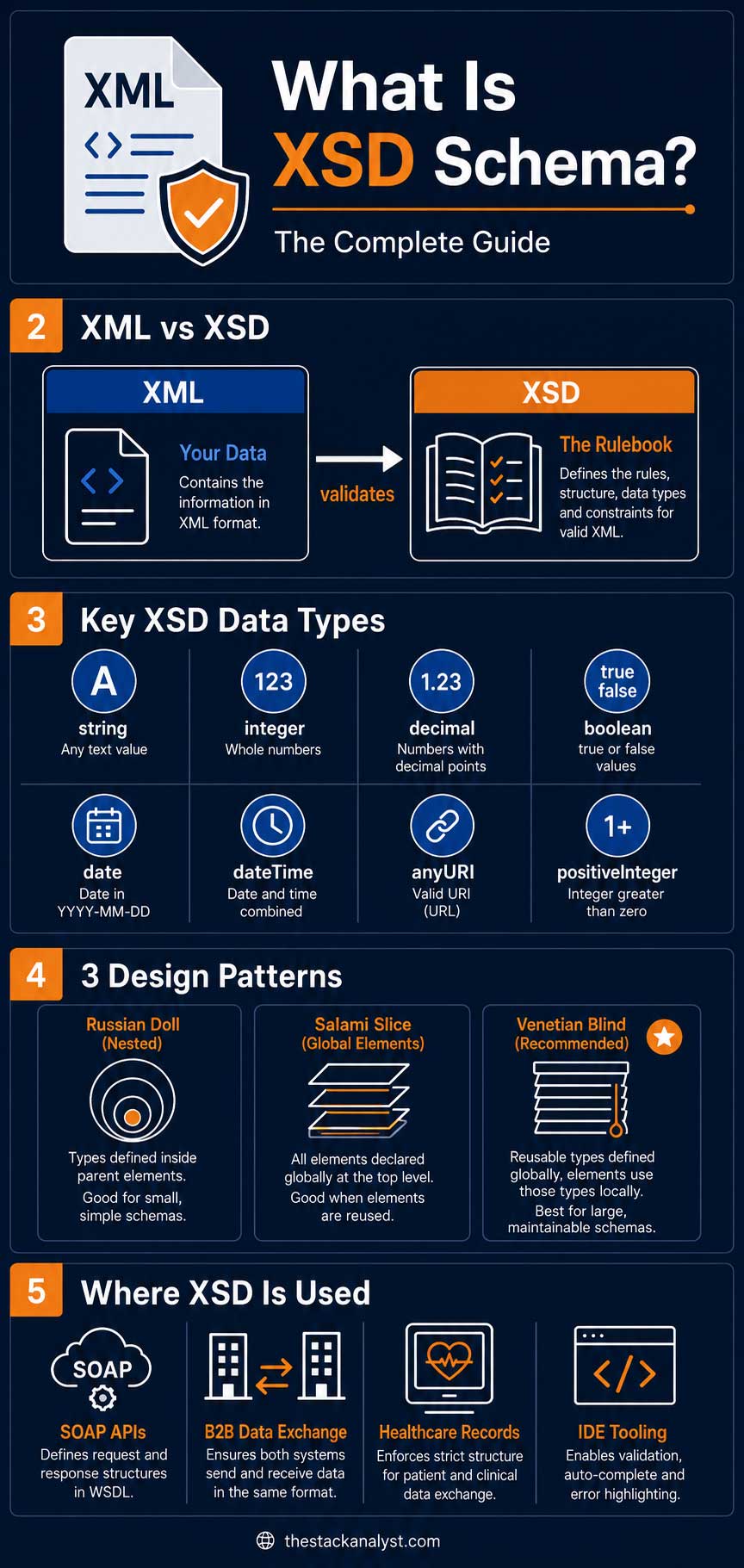
In short: XML is your data. XSD is the rulebook for that data.
XSD vs DTD: What Is the Difference?
Before XSD, XML documents used DTD (Document Type Definition) for structure rules. XSD replaced DTD for most serious applications. Here is why:
| Feature | XSD | DTD |
| Data types | Full type system: integer, date, decimal, boolean and more | Text only, no types at all |
| Namespace support | Yes, full support | Limited |
| Written in | XML itself | A different, older syntax |
| Pattern restrictions | Yes, using xs:pattern | No |
| Reusable types | Yes, named complex types | No |
| Industry adoption | Enterprise standard | Legacy systems only |
Use XSD. Use DTD only when a legacy system forces you to.
Complete XSD Data Types Reference
This is the section most XSD guides skip. Knowing the full type system lets you review auto-generated schemas properly and write your own restrictions when needed.
Primitive Built-in Types
| XSD Type | Validates | Example |
xs:string | Any text | “Hello”, “ABC-123” |
xs:boolean | True or false only | true, false, 1, 0 |
xs:integer | Any whole number | 42, -7, 0 |
xs:decimal | Numbers with decimals | 2499.00, -3.14 |
xs:float | Single-precision float | 3.14e2 |
xs:double | Double-precision float | 3.14159265 |
xs:date | Calendar date in ISO 8601 | 2026-04-01 |
xs:time | Time of day | 14:30:00 |
xs:dateTime | Date and time combined | 2026-04-01T14:30:00 |
xs:duration | A time span | P1Y2M3D (1 year 2 months 3 days) |
xs:anyURI | A URL or URI | https://example.com |
xs:base64Binary | Base64-encoded binary data | SGVsbG8= |
Derived Numeric Types
| XSD Type | Constraint |
xs:positiveInteger | Integer greater than zero |
xs:nonNegativeInteger | Integer zero or greater |
xs:negativeInteger | Integer less than zero |
xs:nonPositiveInteger | Integer zero or less |
xs:long | 64-bit signed integer |
xs:int | 32-bit signed integer (-2,147,483,648 to 2,147,483,647) |
xs:short | 16-bit signed integer |
xs:byte | 8-bit signed integer |
xs:integer vs xs:int: xs:integer is unbounded and can hold any whole number of any size. xs:int enforces a strict 32-bit limit. For most application IDs and counters, xs:integer is the right choice. Use xs:int only when a hard 32-bit boundary is part of your actual data contract.
String-Derived Types
| XSD Type | What It Enforces |
xs:normalizedString | No tabs, line feeds, or carriage returns |
xs:token | No leading or trailing whitespace, no double-spaces |
xs:language | Valid language codes: en, fr, hi |
xs:Name | Valid XML name, starts with a letter or underscore |
xs:ID | Value must be unique within the document |
xs:IDREF | Reference to an xs:ID value elsewhere in the document |
XSD Restrictions: Controlling Exactly What Values Are Allowed
Restrictions are the most powerful XSD feature for real data quality. They let you tighten any base type with specific constraints so that only values matching your business rules pass validation.
Pattern Restriction (Regular Expression)
Use this for PIN codes, phone numbers, product codes, GSTINs, and any field with a fixed format.
<!-- Indian PIN code: exactly 6 digits -->
<xs:element name="pincode">
  <xs:simpleType>
    <xs:restriction base="xs:string">
      <xs:pattern value="[0-9]{6}"/>
    </xs:restriction>
  </xs:simpleType>
</xs:element>

<!-- Indian GSTIN format -->
<xs:element name="gstin">
  <xs:simpleType>
    <xs:restriction base="xs:string">
      <xs:pattern value="[0-9]{2}[A-Z]{5}[0-9]{4}[A-Z][1-9A-Z]Z[0-9A-Z]"/>
    </xs:restriction>
  </xs:simpleType>
</xs:element>
Enumeration Restriction (Fixed List of Values)
<xs:element name="orderStatus">
  <xs:simpleType>
    <xs:restriction base="xs:string">
      <xs:enumeration value="pending"/>
      <xs:enumeration value="processing"/>
      <xs:enumeration value="shipped"/>
      <xs:enumeration value="delivered"/>
      <xs:enumeration value="cancelled"/>
    </xs:restriction>
  </xs:simpleType>
</xs:element>
Range Restriction (Minimum and Maximum Values)
<!-- Product rating must be between 1 and 5 -->
<xs:element name="rating">
  <xs:simpleType>
    <xs:restriction base="xs:integer">
      <xs:minInclusive value="1"/>
      <xs:maxInclusive value="5"/>
    </xs:restriction>
  </xs:simpleType>
</xs:element>
Length Restriction
<!-- Username must be between 3 and 20 characters -->
<xs:element name="username">
  <xs:simpleType>
    <xs:restriction base="xs:string">
      <xs:minLength value="3"/>
      <xs:maxLength value="20"/>
    </xs:restriction>
  </xs:simpleType>
</xs:element>
minOccurs and maxOccurs: Controlling How Many Times an Element Appears
Cardinality defines how many times an element may appear in a valid document. It is controlled by two attributes on every element declaration.
| Attribute | Value | Meaning |
| minOccurs | 0 | Element is optional and may be absent |
| minOccurs | 1 | Element is required and must appear at least once |
| maxOccurs | 1 | Element appears at most once (this is the default) |
| maxOccurs | 3 | Element can appear up to 3 times |
| maxOccurs | unbounded | Element can repeat as many times as needed |
<!-- Required, appears exactly once -->
<xs:element name="customerId" type="xs:integer" minOccurs="1" maxOccurs="1"/>

<!-- Optional, appears at most once -->
<xs:element name="middleName" type="xs:string" minOccurs="0" maxOccurs="1"/>

<!-- Required, can repeat without limit -->
<xs:element name="orderItem" type="xs:string" minOccurs="1" maxOccurs="unbounded"/>

<!-- Optional, can appear up to 3 times -->
<xs:element name="phoneNumber" type="xs:string" minOccurs="0" maxOccurs="3"/>
The Three XSD Design Patterns
How you structure an XSD file is just as important as what it contains. There are three recognized patterns, and choosing the right one from the start prevents expensive rework as your schema grows.
Pattern 1: Russian Doll (Everything Nested)
Type definitions are nested directly inside their parent elements, like Russian dolls stacked inside each other. This is the default output of most schema generators.
<xs:element name="order">
  <xs:complexType>
    <xs:sequence>
      <xs:element name="customer">
        <xs:complexType>
          <xs:sequence>
            <xs:element name="name"  type="xs:string"/>
            <xs:element name="email" type="xs:string"/>
          </xs:sequence>
        </xs:complexType>
      </xs:element>
    </xs:sequence>
  </xs:complexType>
</xs:element>- Good for: Small, simple, one-off schemas that will not be reused or shared
- Problem: Nothing is reusable. If a customer element appears in both orders and invoices, you have to define it twice in full
Pattern 2: Salami Slice (All Elements at the Top)
Every element is declared globally at the top level and referenced from wherever it is needed.
<xs:element name="name"  type="xs:string"/>
<xs:element name="email" type="xs:string"/>

<xs:element name="customer">
  <xs:complexType>
    <xs:sequence>
      <xs:element ref="name"/>
      <xs:element ref="email"/>
    </xs:sequence>
  </xs:complexType>
</xs:element>- Good for: Schemas where the same elements appear in multiple places
- Problem: Can become very verbose and hard to navigate for large schemas
Pattern 3: Venetian Blind (Recommended for Production)
Named type definitions are declared globally at the top. Elements are declared locally but reference those named types. This is the most professional approach for any schema that will be maintained over time.
<!-- Define the type once at the top -->
<xs:complexType name="AddressType">
  <xs:sequence>
    <xs:element name="street"  type="xs:string"/>
    <xs:element name="city"    type="xs:string"/>
    <xs:element name="pincode" type="xs:string"/>
  </xs:sequence>
</xs:complexType>

<!-- Reference it wherever needed. Change once, updates everywhere -->
<xs:element name="billingAddress"     type="AddressType"/>
<xs:element name="shippingAddress"    type="AddressType"/>
<xs:element name="registeredAddress" type="AddressType"/>- Good for: Any schema that will grow, be shared between teams, or be updated regularly
- Why it wins: Change AddressType once and every element that references it updates automatically
Quick rule: Russian Doll for small one-off schemas. Venetian Blind for anything shared or long-lived.
How to Validate XML Against an XSD in Code
Once you have a working schema, here is how to use it for validation in the three most common server-side languages.
Python
from lxml import etree

schema   = etree.XMLSchema(etree.parse("schema.xsd"))
document = etree.parse("data.xml")

if schema.validate(document):
    print("Valid: document passed schema validation.")
else:
    for error in schema.error_log:
        print(f"Error on line {error.line}: {error.message}")
Java
import javax.xml.XMLConstants;
import javax.xml.validation.*;
import javax.xml.transform.stream.StreamSource;
import java.io.File;

SchemaFactory factory = SchemaFactory.newInstance(XMLConstants.W3C_XML_SCHEMA_NS_URI);
Schema schema         = factory.newSchema(new File("schema.xsd"));
Validator validator   = schema.newValidator();

try {
    validator.validate(new StreamSource(new File("data.xml")));
    System.out.println("Valid: document passed schema validation.");
} catch (Exception e) {
    System.out.println("Validation failed: " + e.getMessage());
}
Node.js
const libxml = require('libxmljs2');
const fs     = require('fs');

const xsd = libxml.parseXml(fs.readFileSync('schema.xsd', 'utf8'));
const xml = libxml.parseXml(fs.readFileSync('data.xml',   'utf8'));

if (xml.validate(xsd)) {
    console.log('Valid: document passed schema validation.');
} else {
    console.log('Validation errors:', xml.validationErrors);
}
Where XSD Is Used in Practice
SOAP Web Services and WSDL Files
Every SOAP API embeds XSD schemas inside its WSDL file. The schema defines the exact shape of every request and response message. If you are integrating with a banking API, an insurance system, or a government portal, you will interact with XSD whether you planned to or not. Generate a schema from a sample SOAP message body using the XML to XSD converter, refine it, and import it into your WSDL.
B2B Data Exchange
When two companies exchange XML files like purchase orders, invoices, or shipment notices, an XSD is the formal agreement about what valid data looks like. Both sides validate against the same schema. When a file is rejected, there is no ambiguity about which field caused it and why.
Application Data Intake
Before your application processes any incoming XML file, validate it against your schema. Files that fail get routed to an error queue with a specific message rather than crashing your app three layers deep with an unrelated null pointer exception.
IDE Auto-Complete and Error Highlighting
Link an XSD to your XML file in VS Code or IntelliJ IDEA and you get tag auto-complete, required-field warnings, and type errors highlighted as you type. For anyone writing XML files by hand, this alone is worth generating a schema for.
Healthcare Data (HL7 and FHIR)
Hospital systems use XML with XSD validation to enforce patient record structure across different software platforms. A missing or wrongly typed field in a medical record is not a minor inconvenience, which is why strict schema validation is mandatory in this sector.
Common XSD Validation Errors and How to Fix Them
cvc-type.3.1.3: The value ‘X’ of element ‘Y’ is not valid
The value in your XML does not match the data type declared in the XSD. Check whether the element should be xs:string or a numeric type, and whether your sample data was representative of real values.
cvc-minLength-valid: Value with length = ‘0’ is not valid
An empty string failed a minimum length restriction. Either the field genuinely cannot be empty (the data is the problem) or the restriction is too strict (the schema needs adjusting).
cvc-elt.1.a: Cannot find the declaration of element ‘X’
The namespace in your XML does not match the targetNamespace in your XSD. Copy-paste namespace URIs instead of retyping them. A single misplaced character or an extra trailing slash breaks validation completely, and it is one of the hardest errors to spot by eye.
cvc-complex-type.2.4.a: Invalid content was found
An element appeared that the schema does not expect, or elements appeared in the wrong order. xs:sequence enforces strict ordering. If your XML elements can arrive in any order, switch xs:sequence to xs:all in your schema.
cvc-minOccurs-valid: Missing required element
A required element is absent from the document. Either fix the data to include the element, or if the element is genuinely optional in your business rules, change minOccurs=”1″ to minOccurs=”0″ in the schema.
XSD vs JSON Schema vs Relax NG: Which One Do You Need?
| Format | Works With | Learning Curve | Use It When |
| XSD | XML only | Medium | Enterprise integrations, SOAP APIs, EDI, government data exchange |
| JSON Schema | JSON only | Low | REST APIs, web applications, AI structured output |
| Relax NG | XML | Low | Simpler XML validation without XSD verbosity |
| DTD | XML | Low | Legacy systems only, very limited type support |
If your data is JSON rather than XML, the free JSON Schema generator does the same job: paste your JSON in and get a schema out instantly.
Frequently Asked Questions
What is the difference between XSD and XML?
XML is the data format. It is the actual document holding your data. XSD is the schema: the rulebook describing what valid XML data must look like. You validate an XML document against an XSD to confirm it follows all the rules before processing it.
Do I need to write XSD by hand?
Not for the structural skeleton. A schema generator can produce the full structure from your XML in seconds. You then add business-specific rules like patterns, enumerations, and range restrictions that the generator cannot infer automatically from sample data.
What is xs:any used for?
It allows an element to contain any well-formed XML content, bypassing schema validation for that section. This is useful for extensibility points where you cannot predict the content in advance. Use it sparingly because it eliminates validation for everything inside it.
What is the difference between xs:sequence and xs:all?
xs:sequence requires child elements to appear in the exact order defined in the schema. xs:all allows child elements in any order, with each appearing exactly once. Use xs:all when the incoming XML element order is not guaranteed by the sending system.
Can one XSD file import from another?
Yes. xs:import brings in type definitions from a different namespace. xs:include pulls in definitions from another XSD file in the same namespace. This is standard practice for large enterprise schemas that are split across multiple files by domain or module.
What is targetNamespace in an XSD?
It declares the namespace that the schema is defining. If your XML document has xmlns=”http://example.com/orders”, your XSD must have targetNamespace=”http://example.com/orders” with every character matching exactly. A single character difference will cause all validation to fail.
Is XSD still relevant, or has it been replaced?
XSD is still the dominant standard for XML validation in enterprise environments. SOAP services, EDI, government data exchange, and healthcare systems all rely on it. For JSON-based REST APIs, JSON Schema is the equivalent. See the free JSON Schema generator if you work with JSON data.
Summary
XSD is the validation layer that makes XML reliable in production systems. Understanding data types, cardinality, restrictions, and design patterns lets you work confidently with schemas. Whether you are reviewing auto-generated output, writing custom restrictions, or debugging a validation failure, the concepts in this guide apply directly.
The free XML to XSD converter handles the structural scaffold. The knowledge in this guide handles everything the generator cannot infer: business rules, value patterns, and the right design pattern for your use case.





![Top 200+ Directory Submission Sites List for 2026 [Verified & High-Quality]](https://www.thestackanalyst.com/wp-content/uploads/2026/02/Top-200-Directory-Submission-Sites-List-for-2026-Verified-High-Quality-768x432.jpg)