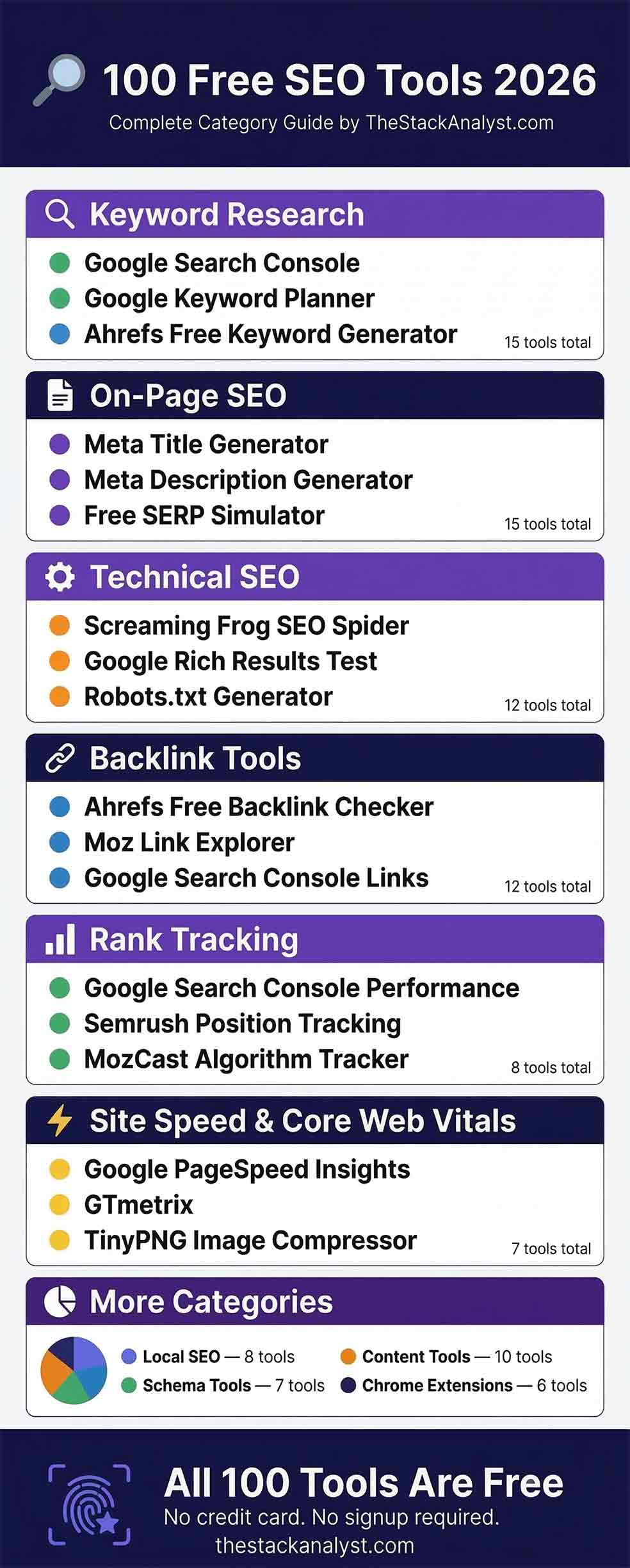
With over 200 SEO tools launched in the last 12 months alone, finding the ones that are actually worth your time has never been harder. This list cuts through the noise. We have tested, categorised, and ranked 100 of the best free SEO tools available in 2026 — covering everything from keyword research and on-page optimisation to technical audits, backlink analysis, and content writing.
Whether you are an SEO beginner in the US, a digital marketing agency in the UK, a freelancer in Canada or Australia, or a small business owner anywhere in the world — every tool on this list is completely free to use with no credit card required.
📋 Table of Contents
- Keyword Research Tools (#1–15)
- On-Page SEO Tools (#16–30)
- Technical SEO Tools (#31–42)
- Backlink & Off-Page Tools (#43–54)
- Content & Writing Tools (#55–64)
- Rank Tracking Tools (#65–72)
- Local SEO Tools (#73–80)
- Schema & Structured Data Tools (#81–87)
- Site Speed & Core Web Vitals Tools (#88–94)
- Chrome Extensions for SEO (#95–100)
Keyword Research Tools
Tools #1–15Keyword research is where every SEO strategy begins. These free tools help you find the exact phrases your target audience types into Google — including search volume, competition level, and related questions.
The single most accurate free keyword tool available. Shows you exactly which queries bring traffic to your site, average position, impressions, and click-through rate. No third-party tool can match its accuracy because the data comes directly from Google. Essential for every website owner regardless of skill level.
Google’s own keyword research tool. Provides monthly search volume ranges, competition levels, and CPC data. While primarily designed for Google Ads, it is invaluable for SEO keyword discovery, especially for identifying high-value commercial keywords popular in the US, UK, and Canada.
Shows how keyword interest changes over time and across geographic regions. Invaluable for identifying seasonal content opportunities, comparing competing keyword phrases, and spotting emerging topics before they become competitive. Especially useful for US market content planning.
Generates up to 150 free keyword ideas for any seed keyword with real search volume and keyword difficulty scores. One of the most trusted free keyword tools available, powered by Ahrefs’ massive 27-billion keyword database. No sign-up required for basic searches.
Neil Patel’s keyword tool offers daily free searches with keyword volume, CPC, competition scores, and content ideas. Particularly beginner-friendly with a clean interface. The free tier provides enough data for small sites to build an initial keyword strategy.
Visualises the questions, prepositions, and comparisons people search around any keyword. Excellent for finding low competition long-tail keyword opportunities and understanding the real questions your audience is asking Google. The free plan allows a limited number of daily searches.
Generates hundreds of long-tail keyword suggestions using Google Autocomplete data. Covers Google, YouTube, Bing, Amazon, and more. The free version shows keyword suggestions without volume data, but the sheer volume of ideas makes it valuable for content ideation and topic clustering.
The free account gives you 10 keyword searches per day with full metrics including volume, keyword difficulty, CPC, and competitive density. More than enough for identifying weekly content targets. The US database is particularly comprehensive, making it ideal for targeting American audiences.
Provides keyword suggestions along with estimated competition and CPC data pulled from Google and Bing. Particularly useful for identifying high-CPC keywords — which directly indicates topics where advertisers pay the most, meaning readers in those niches have high commercial intent.
Offers 10 free queries per month with keyword difficulty, organic CTR opportunity, and priority scoring. Moz’s unique “Priority” score combines difficulty and opportunity to identify the best keywords to target first — a genuine differentiator from other free keyword tools.
Surfaces real questions people ask online, sourced from Reddit, Quora, and other communities. Brilliant for finding FAQ content angles and understanding the exact language your audience uses. A hidden gem for content teams targeting informational keywords with low competition.
Generates thousands of keyword suggestions in seconds from Google Autocomplete. No limits, no sign-up required. Use it for bulk keyword discovery when building out a new topic cluster or content calendar. Export the full list as CSV for analysis in Google Sheets.
Maps out People Also Ask (PAA) questions from Google results in a visual tree structure. Shows you exactly which follow-up questions users ask after searching for your main keyword. Use this to structure FAQ sections, blog subheadings, and schema markup that targets PAA positions.
The simplest and most overlooked keyword research method. Type any keyword into Google and note the autocomplete suggestions — these represent real searches by real users. Combine with an incognito window to eliminate personalisation bias. Zero tools needed, works anywhere.
Analyses keyword frequency and density across any page or text. Once you have chosen your target keyword, use this tool to make sure it appears at the right density in your content — typically 1–2% for primary keywords. Completely free, no sign-up, browser-based with no data stored. Also explore our guide on password entropy explained — another free security tool from TheStackAnalyst covering how strong your passwords really are.
On-Page SEO Tools
Tools #16–30On-page SEO tools help you optimise individual pages — from title tags and meta descriptions to heading structure, internal linking, and content quality. These are the tools you use before and after publishing every piece of content.
Generates SEO-optimised title tags for any page or blog post. Simply enter your keyword and page type and it produces multiple title variations following Google’s best practices — under 60 characters, keyword near the front, compelling enough for high click-through rate. Free, no registration needed.
Creates compelling meta descriptions under 160 characters that include your target keyword and a clear call to action. A well-written meta description can increase organic click-through rate by 15–30% even from the same ranking position — making this one of the highest-ROI free tools available.
Previews exactly how your page title, meta description, and URL will appear in Google search results before you publish. Prevents the common mistake of titles being cut off mid-word in SERPs. A must-use tool every time you write a new post or optimise an existing one. Completely free and browser-based.
Generates all essential meta tags for any page — title, description, keywords, robots, viewport, and charset — in one clean HTML block ready to paste into your site’s head section. Saves time and eliminates errors for developers and WordPress users working without an SEO plugin.
Creates Open Graph and Twitter Card meta tags that control how your pages appear when shared on Facebook, LinkedIn, Twitter, and WhatsApp. Correct OG tags can dramatically increase social media click-through rates by showing a compelling image and title instead of a blank or incorrect preview.
Converts any page title or keyword phrase into a clean, SEO-friendly URL slug. Automatically removes stop words, replaces spaces with hyphens, and converts to lowercase. Clean URL slugs are a confirmed Google ranking factor and significantly improve page crawlability and user trust.
The most widely used WordPress SEO plugin with over 13 million active installations. The free version covers title and meta optimisation, XML sitemap generation, breadcrumb control, and readability analysis. Essential for any WordPress site that doesn’t already have an SEO plugin installed.
A powerful Yoast alternative that includes schema markup, 404 monitoring, keyword ranking, and Google Search Console integration in the free version. Many SEOs now prefer RankMath over Yoast for new WordPress sites due to its more generous free feature set.
Runs a comprehensive on-page SEO audit of any URL and provides an overall grade with specific improvement recommendations. Covers meta tags, headings, content length, image alt text, internal links, and page speed. A quick way to identify the most impactful on-page fixes for any page.
Analyses any page for on-page SEO quality, meta information, page structure, link structure, and server configuration. The free account crawls up to 1,000 URLs of your own site, making it one of the most generous free on-page audit tools available in 2026.
Scores your blog post headlines and page titles for SEO strength, emotional impact, and word balance. Higher-scoring headlines consistently achieve better click-through rates from search results. A simple 30-second check that can meaningfully improve your organic CTR over time.
Analyses your content for readability and flags overly complex sentences, passive voice, and hard-to-read phrasing. Google’s quality rater guidelines specifically value content that is easy to understand. Targeting a Grade 7–8 reading level increases time on page and reduces bounce rate.
Counts words, characters, sentences, paragraphs, and reading time for any text. Useful for ensuring your content meets minimum length requirements for competitive keywords. Research consistently shows that top-ranking pages for commercial keywords average 1,500–2,500 words — this tool keeps you on target.
Checks your content for duplicate text across the web. Google penalises duplicate content, so running new posts through a plagiarism checker before publishing is essential hygiene. The free version checks up to 1,000 words per search — sufficient for most blog posts.
Generates an XML sitemap for any website up to 500 pages for free. A properly structured sitemap helps Google crawl and index your site more efficiently. Essential for new websites and for sites that have recently added many new pages or restructured their URL architecture.
Technical SEO Tools
Tools #31–42Technical SEO tools identify and fix the backend issues that prevent Google from properly crawling and indexing your site — broken links, duplicate content, crawl errors, redirect chains, and more.
The industry standard for technical SEO audits. The free version crawls up to 500 URLs and identifies broken links, redirect chains, duplicate title tags, missing meta descriptions, thin content, and more. Used daily by professional SEO agencies worldwide. Available for Windows, Mac, and Linux.
Tests whether your robots.txt file is blocking important pages from being crawled by Google. Accidentally blocking key pages in robots.txt is one of the most common technical SEO mistakes and can cause catastrophic ranking drops. Always test after any changes to your robots.txt file.
Generates a correctly formatted robots.txt file for your website with options to allow or disallow specific crawlers, directories, and files. A properly configured robots.txt prevents search engines from crawling admin pages, duplicate content, and internal search results that waste crawl budget.
Validates your schema markup and confirms whether your pages are eligible for rich results in Google Search — including FAQ dropdowns, star ratings, recipe cards, and more. Should be run every time you add or modify structured data on any page. Essential for schema implementation verification.
The official validator from Schema.org that checks your structured data for errors and warnings beyond what Google’s Rich Results Test covers. Particularly useful for checking Article, BreadcrumbList, and WebApplication schema types that don’t trigger rich results but still influence how Google understands your content.
Traces the full redirect chain for any URL and shows each hop, status code, and final destination. Redirect chains (A→B→C) waste PageRank and slow down page load time. This tool makes it quick to identify and fix chains so your link equity flows cleanly to the correct destination page.
Checks the HTTP status code of any URL in bulk — up to 100 URLs at once. Quickly identifies 404 errors, 301 redirects, 302 temporary redirects, and server errors across your site. Bulk checking is significantly faster than checking URLs one by one in a browser.
Tests whether any page is mobile-friendly according to Google’s standards. Since Google uses mobile-first indexing, a page that fails this test is likely to rank significantly lower than a mobile-optimised competitor. Run this test on every new page template before launching.
Verifies that all pages on your site are served over HTTPS and that there are no mixed content issues. HTTPS is a confirmed Google ranking signal, and mixed content warnings in browser consoles can damage user trust and trigger security warnings that increase bounce rate.
Validates your XML sitemap for errors, checks that all URLs return a 200 status code, and identifies any pages that are blocked by robots.txt or noindex tags but are still included in the sitemap — a common misconfiguration that confuses search engines.
Checks canonical tags on any URL to confirm the correct canonical is set and matches expectations. Incorrect or missing canonical tags cause duplicate content issues that can dilute PageRank across multiple similar pages. Particularly important for e-commerce sites and paginated content.
Bing’s free equivalent of Google Search Console. Shows your site’s performance in Bing and Microsoft’s search ecosystem — which includes Yahoo and DuckDuckGo. Often overlooked, but Bing drives significant traffic in the US, Canada, and UK, particularly among older demographics and Microsoft Edge users.
Backlink & Off-Page SEO Tools
Tools #43–54Backlinks remain one of the strongest ranking signals in Google’s algorithm. These free tools help you analyse your own backlink profile, find competitor link sources, and identify new link building opportunities.
Shows the top 100 backlinks to any website for free, including Domain Rating, anchor text, and link type (dofollow/nofollow). One of the most reliable free backlink tools available. Use it to analyse competitor backlink profiles and identify which sites are linking to them but not to you.
Provides Domain Authority (DA), Page Authority (PA), and Spam Score alongside backlink data. The free tier allows 10 queries per month with detailed link metrics. DA is the most widely referenced site authority metric across the SEO industry and is essential for evaluating link quality.
The free account allows 10 backlink lookups per day with referring domains, anchor text distribution, and Authority Score data. Particularly useful for analysing the backlink velocity of competitors — how quickly they are acquiring new links — which indicates the aggressiveness of their off-page strategy.
Features two unique metrics — Trust Flow and Citation Flow — that assess both the quality and quantity of backlinks separately. A high Trust Flow relative to Citation Flow indicates a healthy, natural-looking link profile. The free plan allows limited daily lookups for any domain.
Shows your site’s top linking domains and most linked pages directly from Google — completely free with no query limits. While it shows fewer links than paid tools, the data is 100% accurate for your own site. The “Top linking sites” report is the most reliable source for understanding your actual link profile.
Provides detailed backlink analysis including link freshness, anchor text distribution, and industry category of linking domains. The free plan is one of the most generous available — showing far more data than most competitors’ free tiers. Particularly useful for finding fresh link building opportunities.
Typing “link:example.com” into Google shows a sample of pages linking to any domain. While Google no longer returns comprehensive results, it is still useful for a quick sanity check on who is linking to competitors and for discovering unexpected brand mentions that could be converted into links.
Shows which content in any niche gets the most social shares and backlinks. The free plan allows limited searches but is enough to identify the content formats and topics in your niche that naturally attract the most links — invaluable for planning link-worthy content pieces.
Finds verified email addresses for any domain, enabling direct outreach for link building, guest posting, and partnership opportunities. The free plan gives 25 searches per month — enough for targeted outreach to the most valuable sites in your niche.
Sends email notifications whenever your brand, website name, or target keywords appear in new web content. Essential for monitoring brand mentions that have not yet been converted into backlinks — unlinked mentions are among the easiest link building wins because the site already knows your brand.
Monitors your backlink profile and sends alerts when you gain or lose backlinks. Losing a high-quality backlink without knowing about it can cause unexplained ranking drops. The free plan monitors up to 2 domains and 50 links — sufficient for monitoring your most important pages.
Simplifies the creation of Google’s disavow file format for removing toxic backlinks. Paste in a list of spammy referring domains and it generates a correctly formatted disavow.txt file ready to upload to Google Search Console. Essential for sites that have been targeted by negative SEO attacks.
Content & Writing Tools
Tools #55–64The industry standard for website traffic analysis. Shows which content drives the most engaged traffic, where users drop off, and which pages convert best. In 2026, GA4’s AI-powered insights surface actionable recommendations automatically. Free for all websites with no traffic limits.
Converts text between uppercase, lowercase, title case, and sentence case instantly. Title case is the standard for blog post H1 headings and page titles in US English content. A small but frequently needed formatting tool for content writers and SEO teams handling large volumes of content.
AI-powered grammar and writing quality checker. Google’s quality rater guidelines explicitly value well-written, error-free content. The free version catches grammar mistakes, spelling errors, and basic clarity issues across all your content — from blog posts to meta descriptions and email outreach.
The most widely used duplicate content checker. Searches the web for copies of your content that may be causing duplicate content issues. The free version checks one URL at a time. Essential for verifying originality before publishing and for identifying content scrapers copying your work.
Generates creative blog post title ideas from any keyword. While results can be amusing rather than immediately usable, the tool often suggests unexpected angles on familiar topics that can lead to genuinely differentiated content — which is the single most important factor for earning natural backlinks.
Analyses top-ranking pages for any keyword and generates a content outline based on what the best-ranking content covers. The free tier allows limited monthly searches but is highly useful for ensuring comprehensive topic coverage — a key factor in Google’s helpful content evaluation.
Calculates Flesch-Kincaid readability scores, grade levels, and reading ease for any text. Top-ranking content for broad US audiences typically targets a Grade 7–8 reading level. Overly academic or complex writing increases bounce rate and reduces time on page — both negative engagement signals for Google.
Shows live traffic to your site as it happens. Use it to verify that newly published content is being indexed and receiving traffic, to monitor the impact of social shares and link placements in real time, and to confirm that your Google Search Console indexing requests are taking effect.
Provides keyword ideas with search intent classification — informational, navigational, commercial, or transactional. Understanding search intent is critical for creating content that matches what Google wants to rank for any given keyword. Aligning content type with intent is a stronger ranking factor than keyword density.
Free heatmap and session recording tool that shows exactly how users interact with your content — where they click, how far they scroll, and where they rage-click. This behavioural data is invaluable for improving content layout, CTA placement, and identifying sections where users disengage and leave.
Rank Tracking Tools
Tools #65–72Tracks your average ranking positions for every keyword your site appears for — completely free with no keyword limits. Filter by country, device, page, or search type. The 16-month data retention allows you to spot ranking trends over time and measure the impact of on-page optimisation changes.
Tracks daily rankings for up to 10 keywords on the free plan. Shows ranking history, visibility percentage, and SERP feature ownership. The US database is particularly deep, making it valuable for tracking progress in the most competitive and highest-value English-language search market.
Provides daily rank tracking for a small number of keywords on the free tier with location-specific tracking for US, UK, Canada, Australia, and other high-value markets. Location-specific tracking is essential because rankings can vary significantly between geographic markets for the same keyword.
Simple rank checker for tracking keyword positions on Google. The free plan checks up to 5 keywords daily. Particularly useful for tracking the specific low-competition keywords you are targeting — letting you verify that Google is moving your positions in the right direction after content updates.
The simplest rank check: open an incognito browser, type your target keyword, and see where you rank. Do not use a regular browser window — your browsing history personalises results and gives false position data. Use “&gl=us” at the end of a Google URL to check specifically from a US perspective.
Checks Google rankings for any keyword from any specific city or postal code in the US, UK, Canada, and Australia. Local rank checking is essential for businesses targeting geographic markets — national rank does not accurately reflect what local customers actually see in their search results.
A free daily volatility tracker showing how much Google’s search results are fluctuating on any given day. High volatility days indicate algorithm updates are rolling out. Monitoring GRUMP helps you interpret sudden ranking changes — separating genuine long-term shifts from temporary algorithmic fluctuations.
Similar to GRUMP — a daily temperature reading of Google algorithm turbulence. “Hot” days mean high SERP volatility. Cross-reference with Google’s announced updates in Search Central to understand which changes are affecting your rankings and which are temporary fluctuations in the algorithm.
Local SEO Tools
Tools #73–80For businesses targeting customers in specific geographic areas — especially in the US, UK, Canada, and Australia — local SEO tools are essential for appearing in Google Maps and local pack results.
The single most important free tool for local SEO. A fully optimised Google Business Profile is the primary factor determining whether your business appears in the Google Maps local pack. Free for all businesses with a physical address or service area. Consistently maintains and updates this profile for maximum local visibility.
Finds where your business is listed (or not listed) across the web’s major local directories. Consistent NAP (Name, Address, Phone) data across all directories is a critical local ranking factor. Inconsistent citations confuse Google about your business details and suppress local rankings.
Free business listing on Yelp — one of the highest DA local citation sources for US businesses. Yelp reviews and profiles appear prominently in Google results for local searches. Claiming and optimising your Yelp profile provides a strong local citation signal with a dofollow backlink from a DA 90+ domain.
Bing’s equivalent of Google Business Profile. Completely free and covers Bing Maps, which serves Microsoft Edge, Cortana, and Siri users. In the US, Bing’s market share is around 6–8% — significant enough to be worth the 10 minutes it takes to claim and verify your business listing.
Checks how complete and consistent your business listings are across the major US local directories including Google, Yelp, Facebook, and Apple Maps. Gives you an overall local listing health score and identifies the specific directories where your information is missing or incorrect.
Use Google Maps search to conduct competitive local SEO research — search your category in your city and analyse which competitors rank in the top 3 local pack, how many reviews they have, their star rating, and how recently they have been active. This intelligence directly informs your local ranking strategy.
Shows your Google Maps ranking from multiple geographic points within a city on a grid view. A business can rank #1 in Maps from the city centre but rank #10 just 3 kilometres away. This hyper-local rank checking reveals the true geographic reach of your local SEO and identifies areas that need improvement.
Apple’s free business listing platform for Apple Maps, Siri, and Spotlight Search on iPhones. With iPhone users representing 55%+ of US smartphone users, an optimised Apple Maps listing is increasingly important for local businesses — and it remains heavily underutilised by most local SEO campaigns.
Schema & Structured Data Tools
Tools #81–87Validates whether your schema markup qualifies your page for rich results including FAQ dropdowns, star ratings, recipe cards, and event listings. Rich results dramatically increase SERP visibility and CTR — FAQ rich results alone can double the visual space your result occupies on a search page.
Generates correct JSON-LD schema markup for Article, FAQ, HowTo, Product, Review, BreadcrumbList, and many other schema types. Simply fill in the form fields and it produces ready-to-paste JSON-LD code. Eliminates the manual JSON writing that causes most schema implementation errors.
Generates JSON Schema (not to be confused with JSON-LD) for validating data structures in APIs and web applications. Useful for developers ensuring their structured data output matches expected formats before implementing schema markup on live pages. Free, browser-based, no data sent to servers.
Official validation tool from Schema.org itself. Tests any URL or code snippet against the full Schema.org specification. More thorough than Google’s Rich Results Test — catches warnings and errors that Google’s tool misses. Use both tools together for a complete schema validation workflow.
Interactive editor for building and previewing JSON-LD structured data. As you type your JSON-LD code, it validates in real time and shows a graph of the structured data relationships. Valuable for understanding how different schema types connect and for debugging complex @graph implementations.
Previews how any URL will appear when shared on Facebook, Twitter/X, LinkedIn, and WhatsApp — showing the actual Open Graph image, title, and description that social platforms will display. Use this after adding Open Graph tags to verify they are rendering correctly before sharing any content.
Tests Twitter Card meta tags and previews exactly how your content will appear when shared on X (formerly Twitter). Twitter Cards with images get significantly more engagement and clicks than plain text links. Validates summary cards, summary with large image, and app card formats.
Site Speed & Core Web Vitals Tools
Tools #88–94Google’s official Core Web Vitals testing tool. Reports LCP, FID/INP, CLS scores for both mobile and desktop alongside specific improvement recommendations. Since Core Web Vitals became an official Google ranking factor in 2021, passing the “Good” threshold is now a baseline requirement for competitive rankings.
Provides detailed page speed analysis including waterfall charts showing exactly which resources are slowing down page load. Tests from multiple global locations and browsers. The free plan offers one test per day from a Vancouver, Canada server — sufficient for regular performance monitoring of your most important pages.
Tests page load speed from servers in New York, Stockholm, Melbourne, and San José. Testing from multiple locations is essential for sites targeting international audiences — a page that loads fast from a US server may load slowly in Australia. The free plan has no daily limits.
The most detailed free speed testing tool available. Tests from dozens of global locations on real devices, provides filmstrip views of page loading, and measures advanced metrics including Time to First Byte and Speed Index. Preferred by advanced technical SEOs for diagnosing complex performance issues.
Compresses PNG and JPG images by 60–80% without visible quality loss. Large images are the single most common cause of slow page load times. Always compress every image through TinyPNG before uploading to WordPress — a compressed 80KB image loads 5× faster than an uncompressed 400KB version of the same image.
Google’s own image compression tool with support for modern formats including WebP and AVIF. Converting images to WebP format typically reduces file size by 25–35% compared to PNG and JPG while maintaining identical visual quality. Smaller images directly improve LCP scores and Core Web Vitals performance.
Google’s Lighthouse-powered audit tool that measures Performance, Accessibility, Best Practices, and SEO scores for any page. A score of 90+ across all four categories is the target for competitive SEO. The SEO audit flags specific technical issues including missing meta tags, crawlability problems, and mobile usability failures.
Chrome Extensions for SEO
Tools #95–100Shows Domain Rating, URL Rating, organic traffic estimates, and backlink counts for any page you visit. Invaluable for competitor research — browse any competitor’s site and instantly see their page authority metrics. Also highlights broken links on any page in red for quick identification.
Displays Domain Authority and Page Authority for every page in Google search results while you browse. Being able to see DA scores directly in SERPs allows you to quickly assess whether the pages ranking above you are genuinely stronger sites or weaker domains that can be beaten with good content.
Adds an SEO information bar to every page showing Google index status, Bing index status, Alexa rank, SEMrush rank, and social share counts. The in-SERP overlay mode shows metrics for every result on a search page simultaneously — enabling rapid competitive analysis without visiting each page individually.
Provides a clean overview of any page’s on-page SEO elements — title, meta description, canonical, Open Graph, headings hierarchy, internal and external links, and schema markup. Faster than opening DevTools for a quick on-page audit. Particularly useful when auditing competitor pages for content and structure ideas.
Connects your Search Console and Analytics data to show which of your pages are performing best, which new content is gaining traction, and which queries are driving the most traffic to specific pages. Surfaces actionable insights that would otherwise require manual filtering across multiple GSC reports.
Google’s official performance and SEO auditing extension. Runs a complete Lighthouse audit on any page in one click, scoring Performance, Accessibility, Best Practices, and SEO. The SEO report identifies specific technical issues blocking rankings — including missing meta tags, non-crawlable content, and mobile usability failures.
All TheStackAnalyst tools in this list are free, browser-based, and require zero registration. Try our full suite of free SEO, text, and data tools.
🚀 Explore All Free Tools at TheStackAnalyst →How to Use These Free SEO Tools Effectively
Having 100 tools is worthless without a system for using them. Here is a practical workflow based on where you are in the SEO process.
For a brand new website — start with Google Search Console (#1) and Google Analytics (#55) setup. Then use the Robots.txt Generator (#33) and XML Sitemaps Generator (#30) to ensure Google can properly crawl your site. Run a PageSpeed Insights check (#88) on your homepage before publishing any content.
For keyword research — start broad with Google Keyword Planner (#2) to identify high-volume targets, then use AnswerThePublic (#6) and AlsoAsked (#13) to find low-competition long-tail variations and FAQ content angles. Check keyword difficulty with Ahrefs Free Keyword Generator (#4) before committing to a target.
For each new blog post — use the Meta Title Generator (#16), SERP Simulator (#18), and Meta Description Generator (#17) before publishing. After publishing, validate schema with Google Rich Results Test (#34) and request indexing in Search Console.
For backlink building — use Ahrefs Free Backlink Checker (#43) to audit competitor link profiles monthly. Set up Google Alerts (#52) for your brand name to catch unlinked mentions. Use Hunter.io (#51) for outreach when you find relevant link opportunities.
Frequently Asked Questions
What are the best free SEO tools for beginners in 2026?
For beginners, start with Google Search Console, Google Analytics 4, Google Keyword Planner, and Yoast SEO (if using WordPress). These four tools cover the core areas of performance monitoring, keyword research, and on-page optimisation. They are all completely free and provide enough functionality to build a strong SEO foundation without paid tools.
Are free SEO tools accurate enough to use professionally?
Yes, for most tasks. Google’s own tools — Search Console, Keyword Planner, PageSpeed Insights, and Rich Results Test — provide first-party data that paid tools cannot match for accuracy. Free tiers of tools like Ahrefs, Moz, and Semrush provide genuine professional-grade data with usage limits. The main limitation of free tools is the volume of queries and historical data depth, not accuracy.
Which free SEO tools are best for targeting US audiences?
For targeting US audiences specifically, prioritise Google Keyword Planner (US search volumes and CPC data), Semrush’s free tier (deep US keyword database), Google Trends (US regional interest data), and BrightLocal’s free rank checker (US city-level rankings). The US market has the highest advertiser CPCs, which makes identifying high-CPC keywords particularly valuable for US content targeting.
How many SEO tools do I actually need?
Most professional SEOs use 5–8 core tools regularly, not 100. For a new website, you can achieve excellent results with just Google Search Console, Google Analytics, Google Keyword Planner, Ahrefs Free Keyword Generator, Screaming Frog (free version), and PageSpeed Insights. Add specialised tools from this list as specific needs arise rather than trying to use everything at once.
What is the best free keyword research tool for low competition keywords?
For finding low-competition keywords, AnswerThePublic, AlsoAsked, and Google Autocomplete are the most effective free options. They surface long-tail question-based keywords that often have very low keyword difficulty because most content creators focus on shorter, higher-volume terms. Pair these with Ahrefs Free Keyword Generator to verify difficulty scores before targeting.
Do I need paid SEO tools to rank on Google?
No. Many sites achieve excellent rankings using only free tools. Google’s own free tools — Search Console, Analytics, Keyword Planner, PageSpeed Insights, and Rich Results Test — combined with free tiers of Ahrefs, Moz, and Semrush provide a complete SEO toolkit. Paid tools primarily add speed and data volume, not fundamentally different insights. The strategy and content quality matter far more than which tools you use.